Course 8:RFID_Door
Learning Objectives
Learn and master the basic principles and implementation methods of ESP32-controlled RFID access control systems.
Understand the working mechanism of the RC522 RFID module.
Master core technologies such as I2C communication and servo motor control.
Required Component
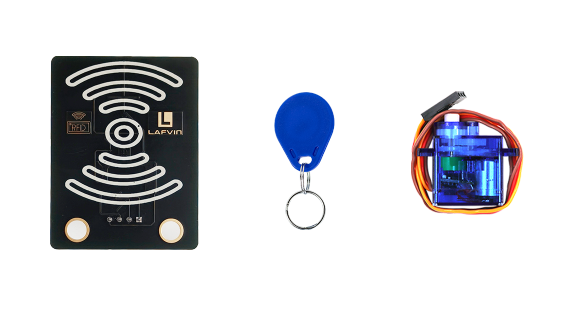
RFID Module、ID Card、SG90 Servo
Working Principle
RFID(Radio Frequency Identification)is a contactless automatic identification technology that uses radio waves to enable data communication between tags and readers.
When an RFID card enters the reader’s radio frequency field, it gains energy through electromagnetic induction and exchanges data with the reader.
Wiring
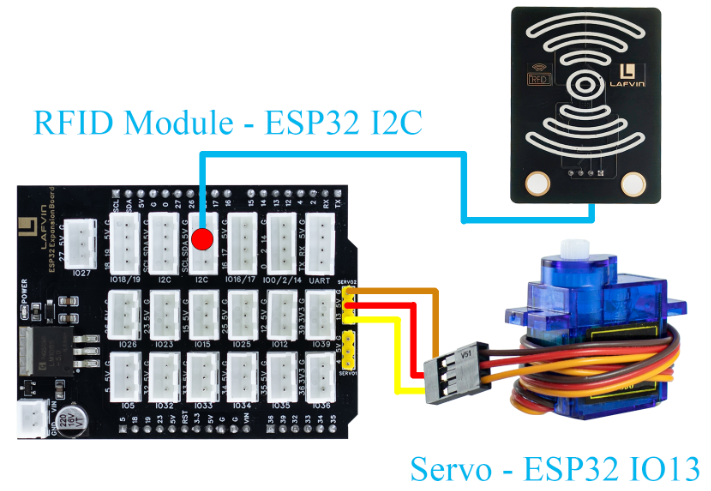
RFID Module —— ESP32 I2C
SG90 Servo —— ESP32 IO13
Example Code
#include <WiFi.h>
#include <WebServer.h>
#include <Wire.h>
#include <MFRC522_I2C.h>
#include <ESP32Servo.h>
#include <Preferences.h>

// ======= Hardware Definition =======
#define RC522_ADDR 0x28
#define I2C_SDA 21
#define I2C_SCL 22
#define SERVO_PIN 13
#define OPEN_ANGLE 90
#define CLOSE_ANGLE 0
#define OPEN_TIME 3000

// ======= WiFi Configuration =======
const char* apSSID = "RFID_Door";  // Access Point SSID (no password)
const char* apPassword = NULL;       // No password

String wifiSSID = "";        // Store target WiFi SSID
String wifiPassword = "";    // Store target WiFi password

bool isConfigMode = true;    // Configuration mode flag
bool wifiConnected = false;  // WiFi connection status

// ======= Objects =======
MFRC522_I2C mfrc522(RC522_ADDR, 0xFF);
Servo doorServo;
WebServer server(80);
Preferences preferences;

String lastCardUID = "None";

// ======= Function Declarations =======
void handleRoot();
void handleOpen();
void handleUID();
void handleConfigure();
void openDoor();
String getHTML();
String getConfigHTML();
bool connectToWiFi();
void setupAccessPoint();

void setup() {
  Serial.begin(115200);
  Wire.begin(I2C_SDA, I2C_SCL);
  mfrc522.PCD_Init();
  Serial.println("RC522 initialized successfully.");

  doorServo.setPeriodHertz(50);
  doorServo.attach(SERVO_PIN, 500, 2400);
  doorServo.write(CLOSE_ANGLE);

  // Initialize preferences
  preferences.begin("wifi-config", false);

  // Try to load saved WiFi credentials
  wifiSSID = preferences.getString("ssid", "");
  wifiPassword = preferences.getString("password", "");

  Serial.println("=== ESP32 RFID Access System ===");

  if (wifiSSID != "" && connectToWiFi()) {
    // Successfully connected to WiFi
    isConfigMode = false;
    wifiConnected = true;
    Serial.println("Mode: Station (Connected to WiFi)");
  } else {
    // Enter configuration mode (Access Point)
    isConfigMode = true;
    wifiConnected = false;
    setupAccessPoint();
    Serial.println("Mode: Access Point (Configuration)");
  }

  // ===== Web Server Setup =====
  server.on("/", handleRoot);
  server.on("/open", handleOpen);
  server.on("/uid", handleUID);
  server.on("/configure", HTTP_POST, handleConfigure);
  server.begin();
  Serial.println("Web Server started.");
}

void loop() {
  server.handleClient();

  // Check RFID Card
  if (mfrc522.PICC_IsNewCardPresent() && mfrc522.PICC_ReadCardSerial()) {
    lastCardUID = "";
    for (byte i = 0; i < mfrc522.uid.size; i++) {
      if (mfrc522.uid.uidByte[i] < 0x10) lastCardUID += "0";
      lastCardUID += String(mfrc522.uid.uidByte[i], HEX);
      if (i < mfrc522.uid.size - 1) lastCardUID += " ";
    }
    lastCardUID.toUpperCase();
    Serial.println("Detected Card UID: " + lastCardUID);

    openDoor();
    mfrc522.PICC_HaltA();
    mfrc522.PCD_StopCrypto1();
  }
}

// ===== Door Control =====
void openDoor() {
  Serial.println("Door opening...");
  doorServo.write(OPEN_ANGLE);
  delay(OPEN_TIME);
  doorServo.write(CLOSE_ANGLE);
  Serial.println("Door closed.");
}

// ===== Connect to WiFi =====
bool connectToWiFi() {
  if (wifiSSID == "") return false;

  Serial.println("Attempting to connect to WiFi: " + wifiSSID);
  WiFi.begin(wifiSSID.c_str(), wifiPassword.c_str());

  int attempts = 0;
  while (WiFi.status() != WL_CONNECTED && attempts < 20) {
    delay(500);
    Serial.print(".");
    attempts++;
  }

  if (WiFi.status() == WL_CONNECTED) {
    Serial.println("\nWiFi connected successfully!");
    Serial.println("IP address: " + WiFi.localIP().toString());
    return true;
  } else {
    Serial.println("\nFailed to connect to WiFi");
    return false;
  }
}

// ===== Setup Access Point =====
void setupAccessPoint() {
  Serial.println("Setting up Access Point...");
  WiFi.softAP(apSSID, apPassword);
  Serial.println("Access Point started");
  Serial.println("SSID: " + String(apSSID));
  Serial.println("Password: None (Open Network)");
  Serial.println("IP address: " + WiFi.softAPIP().toString());
}

// ===== Configuration Page Handler =====
void handleConfigure() {
  wifiSSID = server.arg("ssid");
  wifiPassword = server.arg("password");

  // Save credentials to preferences
  preferences.putString("ssid", wifiSSID);
  preferences.putString("password", wifiPassword);

  server.send(200, "text/html",
              "<html><body><h2>Connecting to WiFi...</h2>"
              "<p>SSID: " + wifiSSID + "</p>"
              "<p>Device will restart and attempt connection.</p>"
              "<script>setTimeout(() => { location.href = '/'; }, 3000);</script>"
              "</body></html>");

  delay(2000);
  ESP.restart();
}

// ===== Root Page Handler =====
void handleRoot() {
  if (isConfigMode) {
    server.send(200, "text/html", getConfigHTML());
  } else {
    server.send(200, "text/html", getHTML());
  }
}

// ===== Web Button Open =====
void handleOpen() {
  openDoor();
  server.sendHeader("Location", "/");
  server.send(303);
}

// ===== AJAX UID =====
void handleUID() {
  server.send(200, "text/plain", lastCardUID);
}

// ===== Configuration Web Page HTML =====
String getConfigHTML() {
  String html = R"rawliteral(
<!DOCTYPE html>
<html>
<head>
<meta charset="utf-8">
<meta name="viewport" content="width=device-width, initial-scale=1.0">
<title>ESP32 WiFi Configuration</title>
<style>
  body {
    font-family: "Segoe UI", Roboto, sans-serif;
    background: #f8fafc;
    color: #333;
    text-align: center;
    margin: 0;
    padding: 0;
    height: 100vh;
    display: flex;
    flex-direction: column;
    justify-content: center;
  }
  .container {
    background: #fff;
    border-radius: 20px;
    box-shadow: 0 6px 18px rgba(0,0,0,0.1);
    padding: 30px 20px;
    margin: 0 auto;
    width: 90%;
    max-width: 420px;
  }
  h2 {
    color: #0078d7;
    margin-bottom: 20px;
  }
  input {
    width: 100%;
    padding: 12px;
    margin: 10px 0;
    border: 1px solid #ccc;
    border-radius: 8px;
    box-sizing: border-box;
    font-size: 16px;
  }
  button {
    width: 100%;
    padding: 12px;
    margin-top: 15px;
    font-size: 17px;
    background-color: #0078d7;
    color: white;
    border: none;
    border-radius: 8px;
    cursor: pointer;
    transition: all 0.3s ease;
  }
  button:hover {
    background-color: #005cbf;
  }
</style>
</head>
<body>
  <div class="container">
    <h2>WiFi Configuration</h2>
    <form action="/configure" method="POST">
      <input type="text" name="ssid" placeholder="WiFi SSID" required>
      <input type="password" name="password" placeholder="WiFi Password" required>
      <button type="submit">Connect</button>
    </form>
  </div>
</body>
</html>
)rawliteral";
  return html;
}

// ===== Control Web Page HTML =====
String getHTML() {
  String html = R"rawliteral(
<!DOCTYPE html>
<html>
<head>
<meta charset="utf-8">
<meta name="viewport" content="width=device-width, initial-scale=1.0">
<title>ESP32 RFID Access System</title>
<style>
  body {
    font-family: "Segoe UI", Roboto, sans-serif;
    background: #f8fafc;
    color: #333;
    text-align: center;
    margin: 0;
    padding: 0;
    height: 100vh;
    display: flex;
    flex-direction: column;
    justify-content: center;
  }
  h2 {
    color: #0078d7;
    margin-bottom: 20px;
  }
  .container {
    background: #fff;
    border-radius: 20px;
    box-shadow: 0 6px 18px rgba(0,0,0,0.1);
    padding: 30px 20px;
    margin: 0 auto;
    width: 90%;
    max-width: 420px;
  }
  .door {
    width: 110px;
    height: 130px;
    margin: 25px auto;
    background: linear-gradient(145deg, #d9d9d9, #f2f2f2);
    border-radius: 12px;
    position: relative;
    overflow: hidden;
    transition: transform 0.8s ease-in-out;
  }
  .door.open {
    transform: rotateY(150deg);
  }
  .handle {
    position: absolute;
    right: 10px;
    top: 50%;
    width: 14px;
    height: 14px;
    background: #777;
    border-radius: 50%;
    transform: translateY(-50%);
  }
  button {
    margin-top: 15px;
    padding: 12px 35px;
    font-size: 17px;
    background-color: #0078d7;
    color: white;
    border: none;
    border-radius: 25px;
    cursor: pointer;
    transition: all 0.3s ease;
  }
  button:hover {
    background-color: #005cbf;
    transform: scale(1.05);
  }
  .uid {
    font-size: 1.1em;
    margin-top: 20px;
    color: #444;
  }
  .footer {
    margin-top: 40px;
    font-size: 14px;
    color: #888;
  }
</style>
</head>
<body>
  <div class="container">
    <h2>🔐 ESP32 RFID Access System</h2>
    <div class="door" id="door">
      <div class="handle"></div>
    </div>
    <div class="uid">
      <strong>Last Card UID:</strong><br>
      <span id="uid">Loading...</span>
    </div>
    <form action="/open" method="POST">
      <button type="submit" id="btn">Open Door</button>
    </form>
  </div>
  <div class="footer">© 2025 ESP32 Access System</div>

<script>
  const uidDisplay = document.getElementById("uid");
  const door = document.getElementById("door");
  const btn = document.getElementById("btn");

  // AJAX refresh UID every 1s
  setInterval(() => {
    fetch("/uid").then(res => res.text()).then(data => {
      uidDisplay.textContent = data;
    });
  }, 1000);

  // Door animation
  btn.addEventListener("click", () => {
    door.classList.add("open");
    btn.style.background = "#28a745";
    setTimeout(() => {
      door.classList.remove("open");
      btn.style.background = "#0078d7";
    }, 3000);
  });
</script>
</body>
</html>
)rawliteral";
  return html;
}
Code burning options
You can directly copy the code provided above into the Arduino IDE for burning.
Find the 8.RFID_Door.ino file in the provided folder, download it, open it with the Arduino IDE, and burn the program to the ESP32 development board.
Find the 8.RFID_Door.bin file in the provided folder, download it and use Flash Download Tool to flash the program to the ESP32 development board.
Effects Demonstration
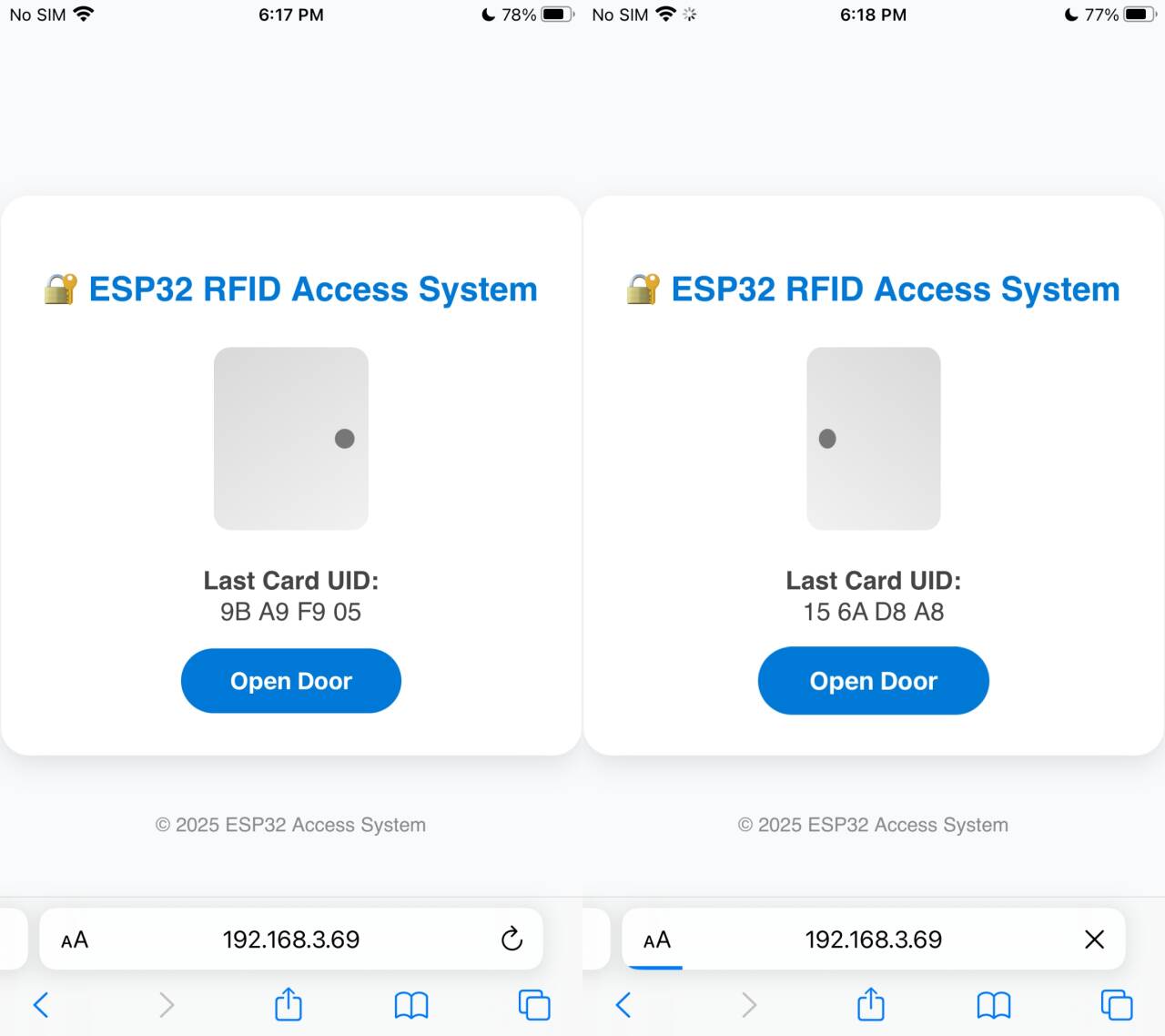
Bring the ID card close to the RFID module. Once the system detects the card, the servo motor will automatically rotate, simulating a door opening action.
The web interface will display the read card number information in real time, and manual door opening and closing can be achieved through control buttons on the webpage.