Course 5:TEMP_Fan
Learning Objectives
Learn the working principle and data communication method of the DHT11 temperature and humidity sensor;
Master the method of reading temperature and humidity data using ESP32;
Understand the application of single-bus communication protocol in sensor data acquisition.
Required Component
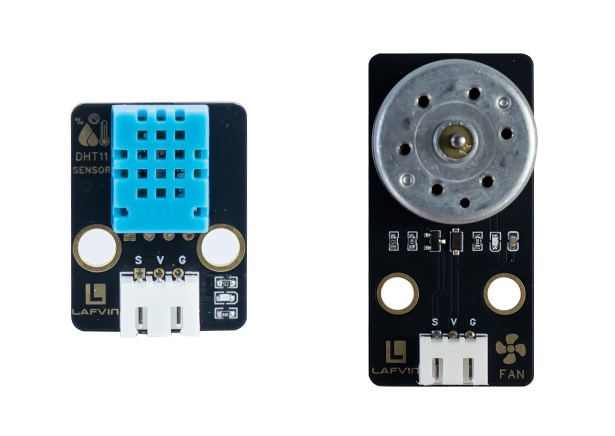
Motor Fan Module、DHT11 Senor
Working Principle
The DHT11 is a single-bus digital temperature and humidity sensor that integrates a temperature sensing element, a resistive humidity sensing element, and a signal processing chip.
It transmits a 40-bit digital signal sequentially via a single bus, sending the acquired temperature and humidity data to the main controller in pulse-width encoded format to achieve environmental temperature and humidity detection.
The 40-bit data(5 bytes in total)consists of: an integer part of humidity, a decimal part of humidity, an integer part of temperature, a decimal part of temperature, and a checksum (the lower 8 bits of the sum of the first four bytes).
Wiring
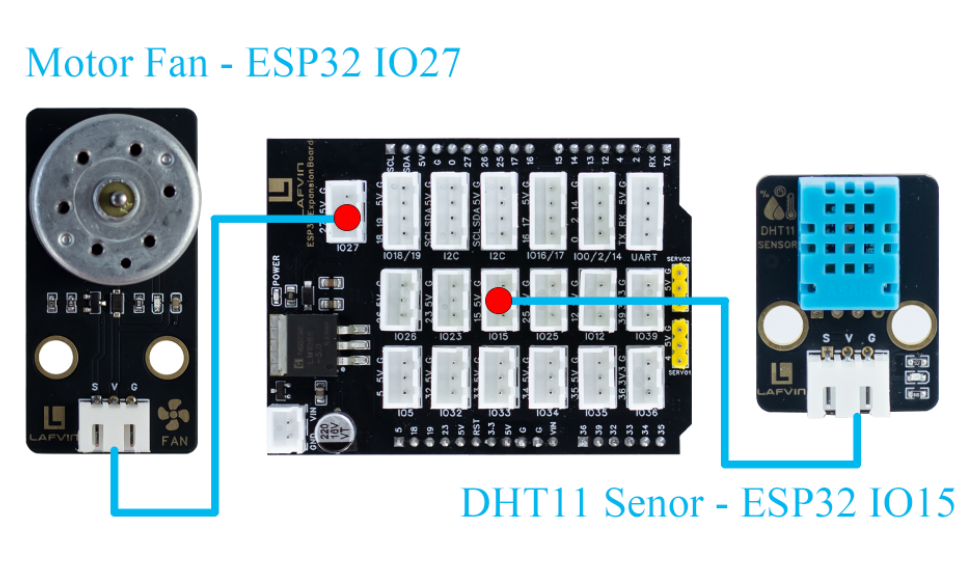
Motor Fan Module —— ESP32 IO27
DHT11 Senor —— ESP32 IO15
Example Code
#include <WiFi.h>
#include <WebServer.h>
#include <DHT.h>
#include <Preferences.h>

// ========== Pin Definitions ==========
#define DHTPIN 15
#define DHTTYPE DHT11
#define FAN_PIN 27

DHT dht(DHTPIN, DHTTYPE);
WebServer server(80);

// ========== Variables ==========
float temperature = 0.0;
float humidity = 0.0;
float thresholdTemp = 30.0; // Default threshold
bool autoMode = true;
bool fanState = false;

// ========== WiFi Configuration ==========
const char* apSSID = "TEMP_Fan";  // Access Point SSID (no password)
const char* apPassword = NULL;           // No password

String wifiSSID = "";        // Store target WiFi SSID
String wifiPassword = "";    // Store target WiFi password

bool isConfigMode = true;    // Configuration mode flag
bool wifiConnected = false;  // WiFi connection status

// ========== Preferences for storing WiFi credentials ==========
Preferences preferences;

// ========== Read Sensor ==========
void readDHT() {
  temperature = dht.readTemperature();
  humidity = dht.readHumidity();
}

// ========== HTML Configuration Page ==========
String configHTMLPage() {
  String page = R"rawliteral(
<!DOCTYPE html>
<html lang="en">
<head>
<meta charset="UTF-8">
<meta name="viewport" content="width=device-width, initial-scale=1.0">
<title>ESP32 WiFi Configuration</title>
<style>
body {
  font-family: 'Segoe UI', sans-serif;
  background: #f0f2f5;
  margin: 0;
  padding-top: 60px;
  display: flex;
  justify-content: center;
}
.container {
  background: #fff;
  border-radius: 16px;
  box-shadow: 0 4px 20px rgba(0,0,0,0.1);
  padding: 25px 30px;
  width: 340px;
  text-align: center;
}
h2 {
  color: #333;
  margin-bottom: 25px;
}
input {
  width: 100%;
  padding: 12px;
  margin: 10px 0;
  border: 1px solid #ccc;
  border-radius: 8px;
  box-sizing: border-box;
  font-size: 16px;
}
button {
  width: 100%;
  padding: 12px;
  font-size: 16px;
  border: none;
  border-radius: 8px;
  background-color: #007BFF;
  color: white;
  cursor: pointer;
  margin-top: 10px;
  transition: 0.3s;
}
button:hover {
  background-color: #0056b3;
}
</style>
</head>
<body>
<div class="container">
  <h2>WiFi Configuration</h2>
  <form action='/configure' method='POST'>
    <input type='text' name='ssid' placeholder='WiFi SSID' required>
    <input type='password' name='password' placeholder='WiFi Password' required>
    <button type='submit'>Connect</button>
  </form>
</div>
</body>
</html>
)rawliteral";
  return page;
}

// ========== HTML Control Page (Original Design) ==========
String controlHTMLPage() {
  String page = R"rawliteral(
<!DOCTYPE html>
<html lang="en">
<head>
<meta charset="UTF-8">
<meta name="viewport" content="width=device-width, initial-scale=1.0">
<title>ESP32 Human Body Detection System</title>
<style>
body {
  font-family: 'Segoe UI', sans-serif;
  background: #f0f2f5;
  margin: 0;
  padding-top: 60px;
  display: flex;
  justify-content: center;
}
.container {
  background: #fff;
  border-radius: 16px;
  box-shadow: 0 4px 20px rgba(0,0,0,0.1);
  padding: 25px 30px;
  width: 340px;
  text-align: center;
}
h2 {
  color: #333;
  margin-bottom: 25px;
}
.progress-container {
  background: #ddd;
  border-radius: 25px;
  overflow: hidden;
  height: 28px;
  margin: 10px 0 20px;
  position: relative;
}
.progress-bar {
  height: 100%;
  width: 0%;
  line-height: 28px;
  color: #fff;
  font-weight: bold;
  transition: width 0.5s ease;
  border-radius: 25px;
}

/* Mode switch */
.switch {
  position: relative;
  display: inline-block;
  width: 60px;
  height: 30px;
}
.switch input {display:none;}
.slider {
  position: absolute;
  cursor: pointer;
  top: 0; left: 0; right: 0; bottom: 0;
  background-color: #ccc;
  transition: .4s;
  border-radius: 30px;
}
.slider:before {
  position: absolute;
  content: "";
  height: 24px; width: 24px;
  left: 3px; bottom: 3px;
  background-color: white;
  transition: .4s;
  border-radius: 50%;
}
input:checked + .slider {background-color: #4CAF50;}
input:checked + .slider:before {transform: translateX(30px);}

/* Fan button */
button {
  width: 120px;
  padding: 10px;
  font-size: 16px;
  border: none;
  border-radius: 25px;
  background-color: #007BFF;
  color: white;
  cursor: pointer;
  margin-top: 15px;
  transition: 0.3s;
}
button:hover {background-color: #0056b3;}

/* Threshold input */
input[type="number"] {
  width: 100px;
  padding: 6px;
  border: 1px solid #ccc;
  border-radius: 8px;
  text-align: center;
  font-size: 16px;
  margin-top: 10px;
}
.ok-btn {
  padding: 7px 14px;
  background-color: #28a745;
  border: none;
  color: white;
  border-radius: 8px;
  margin-left: 5px;
  cursor: pointer;
}
.ok-btn:hover {background-color: #218838;}
</style>
</head>
<body>
<div class="container">
  <h2>ESP32 Temperature Fan System</h2>

  <div>
    <b>Temperature:</b> <span id="temp">0</span>°C
    <div class="progress-container"><div id="tempBar" class="progress-bar"></div></div>
  </div>
  <div>
    <b>Humidity:</b> <span id="hum">0</span>%
    <div class="progress-container"><div id="humBar" class="progress-bar"></div></div>
  </div>

  <h3>Mode</h3>
  <label class="switch">
    <input type="checkbox" id="autoToggle" onchange="toggleMode()">
    <span class="slider"></span>
  </label>
  <div id="modeText">Auto</div>

  <h3>Manual Fan Control</h3>
  <button id="fanBtn" onclick="toggleFan()">OFF</button>

  <h3>Temperature Threshold</h3>
  <input type="number" id="thInput" step="0.1" min="10" max="50" value="30.0">
  <button class="ok-btn" onclick="setThreshold()">OK</button>
</div>

<script>
function updateData(){
  fetch("/data").then(r=>r.json()).then(data=>{
    document.getElementById("temp").innerText = data.temperature.toFixed(1);
    document.getElementById("hum").innerText = data.humidity.toFixed(0);
    document.getElementById("autoToggle").checked = data.autoMode;
    document.getElementById("modeText").innerText = data.autoMode ? "Auto" : "Manual";
    document.getElementById("fanBtn").innerText = data.fanState ? "ON" : "OFF";

    let t = Math.min(data.temperature*2, 100);
    let h = Math.min(data.humidity, 100);
    document.getElementById("tempBar").style.width = t+"%";
    document.getElementById("humBar").style.width = h+"%";
    document.getElementById("tempBar").style.background = "#FF3333";
    document.getElementById("humBar").style.background = "#5EB8FF";
  });
}

function toggleMode(){ fetch("/toggleMode"); }
function toggleFan(){ fetch("/toggleFan"); }
function setThreshold(){
  let val = document.getElementById("thInput").value;
  fetch("/setThreshold?val="+val);
}

setInterval(updateData, 1000);
updateData();
</script>
</body>
</html>
)rawliteral";
  return page;
}

// ========== Request Handlers ==========
void handleRoot() {
  if (isConfigMode) {
    server.send(200, "text/html", configHTMLPage());
  } else {
    server.send(200, "text/html", controlHTMLPage());
  }
}

void handleData() {
  readDHT();
  if (autoMode) {
    if (temperature >= thresholdTemp) fanState = true;
    else fanState = false;
    digitalWrite(FAN_PIN, fanState ? HIGH : LOW);
  }
  String json = "{";
  json += "\"temperature\":" + String(temperature,1) + ",";
  json += "\"humidity\":" + String(humidity,0) + ",";
  json += "\"autoMode\":" + String(autoMode ? "true" : "false") + ",";
  json += "\"fanState\":" + String(fanState ? "true" : "false");
  json += "}";
  server.send(200, "application/json", json);
}

void handleToggleMode() {
  autoMode = !autoMode;
  Serial.println(autoMode ? "Mode: Auto" : "Mode: Manual");
  server.send(200, "text/plain", "ok");
}

void handleToggleFan() {
  if (!autoMode) {
    fanState = !fanState;
    digitalWrite(FAN_PIN, fanState ? HIGH : LOW);
    Serial.println(fanState ? "Fan ON (Manual)" : "Fan OFF (Manual)");
  }
  server.send(200, "text/plain", "ok");
}

void handleSetThreshold() {
  if (server.hasArg("val")) thresholdTemp = server.arg("val").toFloat();
  Serial.println("Threshold set to: " + String(thresholdTemp,1) + "°C");
  server.send(200, "text/plain", "ok");
}

void handleConfigure() {
  wifiSSID = server.arg("ssid");
  wifiPassword = server.arg("password");

  // Save credentials to preferences
  preferences.putString("ssid", wifiSSID);
  preferences.putString("password", wifiPassword);

  server.send(200, "text/html",
              "<html><body><h2>Connecting to WiFi...</h2>"
              "<p>SSID: " + wifiSSID + "</p>"
              "<p>Device will restart and attempt connection.</p>"
              "<script>setTimeout(() => { location.href = '/'; }, 3000);</script>"
              "</body></html>");

  delay(2000);
  ESP.restart();
}

// ========== Connect to WiFi ==========
bool connectToWiFi() {
  if (wifiSSID == "") return false;

  Serial.println("Attempting to connect to WiFi: " + wifiSSID);
  WiFi.begin(wifiSSID.c_str(), wifiPassword.c_str());

  int attempts = 0;
  while (WiFi.status() != WL_CONNECTED && attempts < 20) {
    delay(500);
    Serial.print(".");
    attempts++;
  }

  if (WiFi.status() == WL_CONNECTED) {
    Serial.println("\nWiFi connected successfully!");
    Serial.println("IP address: " + WiFi.localIP().toString());
    return true;
  } else {
    Serial.println("\nFailed to connect to WiFi");
    return false;
  }
}

// ========== Setup Access Point ==========
void setupAccessPoint() {
  Serial.println("Setting up Access Point...");
  WiFi.softAP(apSSID, apPassword);
  Serial.println("Access Point started");
  Serial.println("SSID: " + String(apSSID));
  Serial.println("Password: None (Open Network)");
  Serial.println("IP address: " + WiFi.softAPIP().toString());
}

// ========== Setup ==========
void setup() {
  Serial.begin(115200);
  pinMode(FAN_PIN, OUTPUT);
  dht.begin();

  // Initialize preferences
  preferences.begin("wifi-config", false);

  // Try to load saved WiFi credentials
  wifiSSID = preferences.getString("ssid", "");
  wifiPassword = preferences.getString("password", "");

  Serial.println("=== ESP32 Temperature Fan System ===");

  if (wifiSSID != "" && connectToWiFi()) {
    // Successfully connected to WiFi
    isConfigMode = false;
    wifiConnected = true;
    Serial.println("Mode: Station (Connected to WiFi)");
  } else {
    // Enter configuration mode (Access Point)
    isConfigMode = true;
    wifiConnected = false;
    setupAccessPoint();
    Serial.println("Mode: Access Point (Configuration)");
  }

  server.on("/", handleRoot);
  server.on("/data", handleData);
  server.on("/toggleMode", handleToggleMode);
  server.on("/toggleFan", handleToggleFan);
  server.on("/setThreshold", handleSetThreshold);
  server.on("/configure", HTTP_POST, handleConfigure);

  server.begin();
  Serial.println("Web server started");
}

void loop() {
  server.handleClient();
}
Code burning options
You can directly copy the code provided above into the Arduino IDE for burning.
Find the 5.TEMP_Fan.ino file in the provided folder, download it, open it with the Arduino IDE, and burn the program to the ESP32 development board.
Find the 5.TEMP_Fan.bin file in the provided folder, download it and use Flash Download Tool to flash the program to the ESP32 development board.
Effects Demonstration
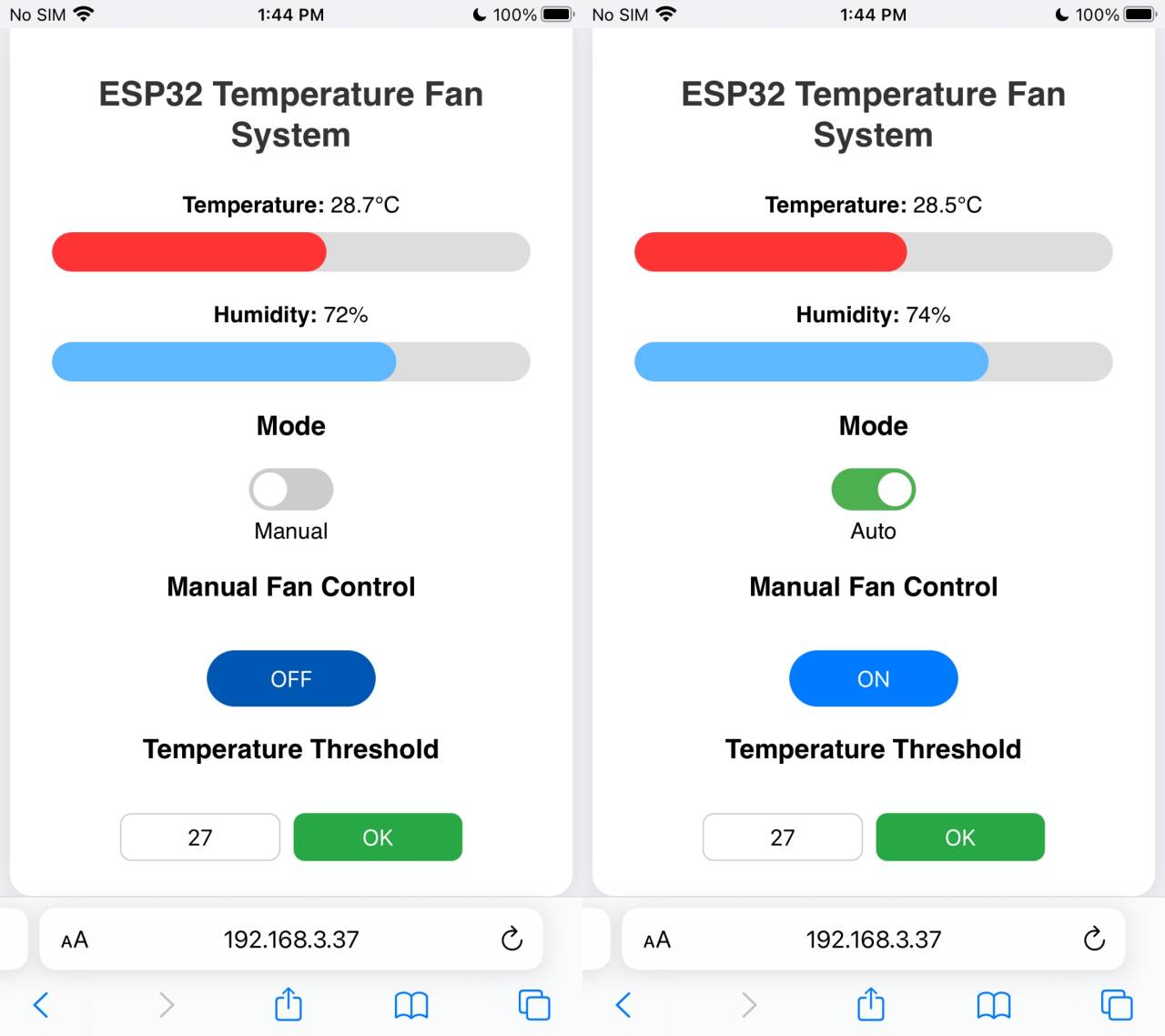
The webpage displays temperature and humidity values.
The system supports switching between manual and automatic modes. In manual mode, the fan can be manually turned on and off via a web button. In automatic mode, the system will automatically turn on the fan to cool down when the ambient temperature reaches a preset threshold, and will automatically turn off when the temperature drops below the threshold.
New temperature thresholds can be set via the webpage.