Course 6:Human_Count
Learning Objectives
Understand the detection principle of PIR infrared human body sensors
Master the digital input detection and interrupt handling mechanism of ESP32
Learn to use a web server to build a local web interface for real-time data viewing and control
Required Component
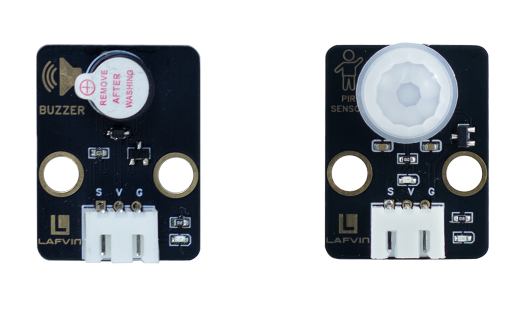
Active Buzzer、PIR Senor
Working Principle
An active buzzer internally consists of an oscillation circuit and a piezoelectric ceramic element. When a DC voltage is supplied externally, the internal oscillation circuit automatically generates an audio signal to drive the piezoelectric element to vibrate, thus producing sound.
A PIR(Passive Infrared Sensor) operates using the pyroelectric effect.When an object with a different temperature (such as a human body) enters its detection area, the infrared radiation emitted by the human body(wavelength approximately 10 μm)causes a change in the charge on the sensor surface, thereby generating a weak electrical signal.
Wiring
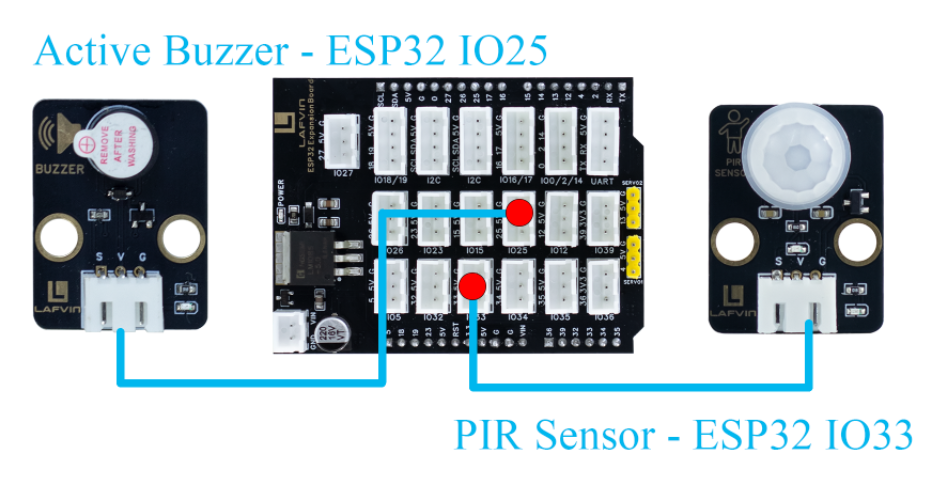
Active Buzzer —— ESP32 IO25
PIR Senor —— ESP32 IO33
Example Code
#include <WiFi.h>
#include <WebServer.h>
#include <Preferences.h>

// ======== Pin Definitions ========
#define PIR_PIN 33
#define BUZZER_PIN 25

WebServer server(80);

volatile bool motionDetected = false;
unsigned long lastMotionTime = 0;
int peopleCount = 0;
bool alarmEnabled = true;

// ======== WiFi Configuration ========
const char* apSSID = "Human_Count";  // Access Point SSID (no password)
const char* apPassword = NULL;          // No password

String wifiSSID = "";        // Store target WiFi SSID
String wifiPassword = "";    // Store target WiFi password

bool isConfigMode = true;    // Configuration mode flag
bool wifiConnected = false;  // WiFi connection status

// ======== Preferences for storing WiFi credentials ========
Preferences preferences;

// ======== HTML Configuration Page ========
String configHTMLPage() {
  String html = R"rawliteral(
<!DOCTYPE html>
<html>
<head>
<meta charset="utf-8">
<meta name="viewport" content="width=device-width,initial-scale=1">
<title>ESP32 WiFi Configuration</title>
<style>
  body {
    font-family: "Segoe UI", Arial, sans-serif;
    background: #f3f7fb;
    display: flex;
    flex-direction: column;
    align-items: center;
    justify-content: center;
    height: 100vh;
    margin: 0;
  }
  .container {
    background: white;
    padding: 30px;
    border-radius: 10px;
    box-shadow: 0 4px 10px rgba(0,0,0,0.1);
    width: 90%;
    max-width: 400px;
    text-align: center;
  }
  h1 {
    color: #222;
    margin-bottom: 25px;
  }
  input {
    width: 100%;
    padding: 12px;
    margin: 10px 0;
    border: 1px solid #ccc;
    border-radius: 6px;
    box-sizing: border-box;
    font-size: 16px;
  }
  button {
    width: 100%;
    padding: 12px;
    margin-top: 15px;
    border: none;
    border-radius: 6px;
    font-size: 18px;
    cursor: pointer;
    background-color: #0078D7;
    color: white;
    transition: 0.2s;
  }
  button:hover {
    background-color: #005fa3;
  }
</style>
</head>
<body>
  <div class="container">
    <h1>WiFi Configuration</h1>
    <form action='/configure' method='POST'>
      <input type='text' name='ssid' placeholder='WiFi SSID' required>
      <input type='password' name='password' placeholder='WiFi Password' required>
      <button type='submit'>Connect</button>
    </form>
  </div>
</body>
</html>
)rawliteral";
  return html;
}

// ======== HTML Control Page (Original Design) ========
String controlHTMLPage() {
  String html = R"rawliteral(
<!DOCTYPE html>
<html>
<head>
<meta charset="utf-8">
<meta name="viewport" content="width=device-width,initial-scale=1">
<title>ESP32 Human Body Detection System</title>
<style>
  body {
    font-family: "Segoe UI", Arial, sans-serif;
    background: #f3f7fb;
    display: flex;
    flex-direction: column;
    align-items: center;
    justify-content: center;
    height: 100vh;
    margin: 0;
  }
  h1 {
    color: #222;
    margin-bottom: 25px;
    text-align: center;
  }
  #status {
    font-size: 26px;
    font-weight: bold;
    color: #444;
    margin: 15px;
  }
  #count {
    font-size: 50px;
    font-weight: bold;
    color: #0078D7;
    margin: 10px;
  }
  button {
    padding: 12px 28px;
    margin-top: 15px;
    border: none;
    border-radius: 6px;
    font-size: 18px;
    cursor: pointer;
    background-color: #0078D7;
    color: white;
    transition: 0.2s;
  }
  button:hover {
    background-color: #005fa3;
  }
</style>
<script>
function fetchData() {
  fetch("/status").then(r=>r.json()).then(data=>{
    document.getElementById("status").innerHTML = data.motion;
    document.getElementById("count").innerHTML = data.count;
  });
}
setInterval(fetchData, 1000);
function resetCount(){
  fetch("/reset").then(()=>fetchData());
}
window.onload = fetchData;
</script>
</head>
<body>
  <h1>ESP32 Human Body Detection System</h1>
  <div id="status">Loading...</div>
  <div>Detected Count:</div>
  <div id="count">0</div>
  <button onclick="resetCount()">Reset Counter</button>
</body>
</html>
)rawliteral";
  return html;
}

// ======== Request Handlers ========
void handleRoot() {
  if (isConfigMode) {
    server.send(200, "text/html", configHTMLPage());
  } else {
    server.send(200, "text/html", controlHTMLPage());
  }
}

void handleStatus() {
  String motion = motionDetected ? "⚠️ Motion Detected!" : "✅ No Motion";
  String json = "{\"motion\":\"" + motion + "\",\"count\":" + String(peopleCount) + "}";
  server.send(200, "application/json", json);
}

void handleReset() {
  peopleCount = 0;
  Serial.println("[Web] Counter Reset");
  server.send(200, "text/plain", "OK");
}

void handleConfigure() {
  wifiSSID = server.arg("ssid");
  wifiPassword = server.arg("password");

  // Save credentials to preferences
  preferences.putString("ssid", wifiSSID);
  preferences.putString("password", wifiPassword);

  server.send(200, "text/html",
              "<html><body><h2>Connecting to WiFi...</h2>"
              "<p>SSID: " + wifiSSID + "</p>"
              "<p>Device will restart and attempt connection.</p>"
              "<script>setTimeout(() => { location.href = '/'; }, 3000);</script>"
              "</body></html>");

  delay(2000);
  ESP.restart();
}

// ======== Connect to WiFi ========
bool connectToWiFi() {
  if (wifiSSID == "") return false;

  Serial.println("Attempting to connect to WiFi: " + wifiSSID);
  WiFi.begin(wifiSSID.c_str(), wifiPassword.c_str());

  int attempts = 0;
  while (WiFi.status() != WL_CONNECTED && attempts < 20) {
    delay(500);
    Serial.print(".");
    attempts++;
  }

  if (WiFi.status() == WL_CONNECTED) {
    Serial.println("\nWiFi connected successfully!");
    Serial.println("IP address: " + WiFi.localIP().toString());
    return true;
  } else {
    Serial.println("\nFailed to connect to WiFi");
    return false;
  }
}

// ======== Setup Access Point ========
void setupAccessPoint() {
  Serial.println("Setting up Access Point...");
  WiFi.softAP(apSSID, apPassword);
  Serial.println("Access Point started");
  Serial.println("SSID: " + String(apSSID));
  Serial.println("Password: None (Open Network)");
  Serial.println("IP address: " + WiFi.softAPIP().toString());
}

// ======== Setup ========
void setup() {
  Serial.begin(115200);
  pinMode(PIR_PIN, INPUT);
  pinMode(BUZZER_PIN, OUTPUT);
  digitalWrite(BUZZER_PIN, LOW);

  // Initialize preferences
  preferences.begin("wifi-config", false);

  // Try to load saved WiFi credentials
  wifiSSID = preferences.getString("ssid", "");
  wifiPassword = preferences.getString("password", "");

  Serial.println("=== ESP32 Human Body Detection System ===");

  if (wifiSSID != "" && connectToWiFi()) {
    // Successfully connected to WiFi
    isConfigMode = false;
    wifiConnected = true;
    Serial.println("Mode: Station (Connected to WiFi)");
  } else {
    // Enter configuration mode (Access Point)
    isConfigMode = true;
    wifiConnected = false;
    setupAccessPoint();
    Serial.println("Mode: Access Point (Configuration)");
  }

  server.on("/", handleRoot);
  server.on("/status", handleStatus);
  server.on("/reset", handleReset);
  server.on("/configure", HTTP_POST, handleConfigure);

  server.begin();
  Serial.println("Web server started");
}

// ======== Main Loop ========
void loop() {
  server.handleClient();

  int pirState = digitalRead(PIR_PIN);
  if (pirState == HIGH && !motionDetected) {
    motionDetected = true;
    peopleCount++;
    Serial.println("[Sensor] Motion detected!");
    if (alarmEnabled) {
      digitalWrite(BUZZER_PIN, HIGH);
      delay(1000);
      digitalWrite(BUZZER_PIN, LOW);
    }
    lastMotionTime = millis();
  }

  if (pirState == LOW && millis() - lastMotionTime > 2000) {
    motionDetected = false;
  }
}
Code burning options
You can directly copy the code provided above into the Arduino IDE for burning.
Find the 6.Human_Count.ino file in the provided folder, download it, open it with the Arduino IDE, and burn the program to the ESP32 development board.
Find the 6.Human_Count.bin file in the provided folder, download it and use Flash Download Tool to flash the program to the ESP32 development board.
Effects Demonstration
The PIR sensor is used to detect human activity. A buzzer sounds when someone is detected passing by.
The web interface includes a people counter, displaying the total number of detected people in real time and providing a “Reset Counter” button to reset the count.
