Course 11:Smart_Home

In this course, we will comprehensively utilize the various sensor modules we have learned previously to conduct a practical project. Sensor modules offer a wealth of combination possibilities, allowing for a variety of interesting application solutions. This course will focus on the theme of Smart Home , designing and implementing a lively and engaging interactive experience.
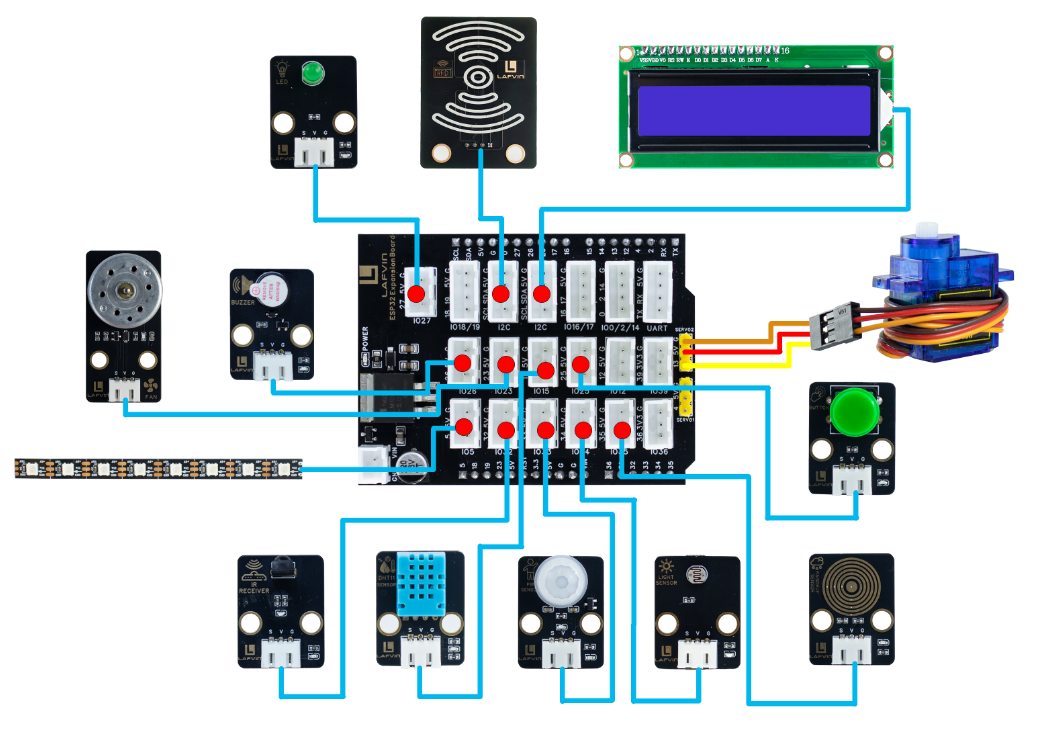
Wiring
DHT11 Sensor —— ESP32 IO15
Light Sensor —— ESP32 IO34
Rain Sensor —— ESP32 IO35
PIR Sensor —— ESP32 IO33
Button —— ESP32 IO25
IR Receiver —— ESP32 IO32
Buzzer —— ESP32 IO26
LED —— ESP32 IO27
Fan —— ESP32 IO23
Servo —— ESP32 IO13
RGB LED —— ESP32 IO5
RFID Module —— ESP32 I2C
LCD 1602 Screen —— ESP32 I2C
Example Code
#include <WiFi.h>
#include <WebServer.h>
#include <DHT.h>
#include <Wire.h>
#include <LiquidCrystal_I2C.h>
#include <MFRC522_I2C.h>
#include <ESP32Servo.h>
#include <Adafruit_NeoPixel.h>
#include <IRremote.h>
#include <Preferences.h>

// ====== Module Pin Definitions ======
#define DHTPIN 15
#define DHTTYPE DHT11
#define LIGHT_PIN 34
#define RAIN_PIN 35
#define PIR_PIN 33
#define BUTTON_PIN 25
#define IR_RECEIVE_PIN 32
#define BUZZER_PIN 26
#define LED_PIN 27
#define FAN_PIN 23
#define SERVO_PIN 13
#define RGB_PIN 5

// I2C devices
#define RC522_ADDR 0x28
#define I2C_SDA 21
#define I2C_SCL 22

// ====== Module Objects ======
DHT dht(DHTPIN, DHTTYPE);
LiquidCrystal_I2C lcd(0x27, 16, 2);
MFRC522_I2C mfrc522(RC522_ADDR, 0xFF);
Servo doorServo;
Adafruit_NeoPixel strip(8, RGB_PIN, NEO_GRB + NEO_KHZ800);
WebServer server(80);
Preferences preferences;

// ====== WiFi Configuration ======
const char* apSSID = "Smart_Home";
const char* apPassword = NULL;

String wifiSSID = "";
String wifiPassword = "";
bool isConfigMode = true;
bool wifiConnected = false;

// ====== System Variables ======
// Sensor data
float temperature = 0;
float humidity = 0;
int lightPercent = 0;
int rainPercent = 0;
bool motionDetected = false;
bool humanDetectionEnabled = true;
float tempThreshold = 30.0;

// Device states
bool ledState = false;
bool fanState = false;
bool fanManualMode = false; // Manual mode flag
bool doorLocked = true;
bool rgbEnabled = false;  // RGB switch state
String currentEffect = "solid"; // Default solid color mode

// RGB control
int rgbR = 255;
int rgbG = 0;
int rgbB = 0;

// Display
String lcdLine1 = "Smart Home System";
String lcdLine2 = "Initializing...";
bool lcdCustomMode = false; // Flag for custom display mode

// RFID
String lastCardUID = "None";

// Alarm
bool alarmActive = false;

// Timing
unsigned long lastSensorRead = 0;
unsigned long lastRGBUpdate = 0;
unsigned long lastLCDUpdate = 0;
const unsigned long SENSOR_INTERVAL = 2000;
const unsigned long RGB_INTERVAL = 50;
const unsigned long LCD_UPDATE_INTERVAL = 2000; // LCD data update interval

// ====== IR Key Mapping ======
String keyMap(uint32_t code) {
  switch(code) {
    case 0x16: return "1";
    case 0x19: return "2";
    case 0x0d: return "3";
    case 0x0c: return "4";
    case 0x18: return "5";
    case 0x5e: return "6";
    case 0x08: return "7";
    case 0x1c: return "8";
    case 0x5A: return "9";
    case 0x52: return "0";
    case 0x42: return "*";
    case 0x4A: return "#";
    case 0x46: return "UP";
    case 0x15: return "DOWN";
    case 0x40: return "OK";
    case 0x44: return "LEFT";
    case 0x43: return "RIGHT";
    default: return "";
  }
}

// ====== Device Control Functions ======
void controlLED() {
  digitalWrite(LED_PIN, ledState ? HIGH : LOW);
  Serial.println("LED: " + String(ledState ? "ON" : "OFF"));
}

void controlFan() {
  // If in manual mode, maintain current state; otherwise auto control
  if (!fanManualMode) {
    if (temperature >= tempThreshold) {
      fanState = true;
    } else {
      fanState = false;
    }
  }
  digitalWrite(FAN_PIN, fanState ? HIGH : LOW);
}

void controlDoor() {
  doorServo.write(doorLocked ? 0 : 90);
  Serial.println("Door: " + String(doorLocked ? "LOCKED" : "UNLOCKED"));
}

void setRGBColor(int r, int g, int b) {
  for(int i=0; i<strip.numPixels(); i++) {
    strip.setPixelColor(i, strip.Color(r, g, b));
  }
  strip.show();
}

void updateRGBEffects() {
  if (!rgbEnabled) {
    // Clear LED strip when RGB is off
    for(int i=0; i<strip.numPixels(); i++) {
      strip.setPixelColor(i, 0);
    }
    strip.show();
    return;
  }

  unsigned long currentMillis = millis();
  static unsigned long effectStart = 0;
  static int effectState = 0;

  if (currentEffect == "solid") {
    // Solid color mode - use color from sliders
    setRGBColor(rgbR, rgbG, rgbB);
  }
  else if (currentEffect == "breath") {
    // Breathing effect
    int brightness = (exp(sin(currentMillis / 2000.0 * PI)) - 0.36787944) * 108.0;
    for(int i=0; i<strip.numPixels(); i++) {
      strip.setPixelColor(i, strip.Color(
        rgbR * brightness / 255,
        rgbG * brightness / 255,
        rgbB * brightness / 255
      ));
    }
  }
  else if (currentEffect == "chase") {
    // Chase effect
    if (currentMillis - effectStart > 100) {
      effectStart = currentMillis;
      for(int i=0; i<strip.numPixels(); i++) {
        if ((i + effectState) % 3 == 0) {
          strip.setPixelColor(i, strip.Color(255, 255, 255));
        } else if ((i + effectState) % 3 == 1) {
          strip.setPixelColor(i, strip.Color(255, 0, 0));
        } else {
          strip.setPixelColor(i, strip.Color(0, 0, 255));
        }
      }
      effectState = (effectState + 1) % 3;
    }
  }
  else if (currentEffect == "fire") {
    // Fire effect
    for(int i=0; i<strip.numPixels(); i++) {
      int flicker = random(0, 50);
      int r = 255 - flicker;
      int g = random(100, 200) - flicker;
      int b = random(0, 50);
      strip.setPixelColor(i, strip.Color(r, g, b));
    }
  }

  strip.show();
}

void controlRGB() {
  // Update RGB state
  if (rgbEnabled) {
    Serial.println("RGB Enabled - Effect: " + currentEffect);
  } else {
    Serial.println("RGB Disabled");
    for(int i=0; i<strip.numPixels(); i++) {
      strip.setPixelColor(i, 0);
    }
    strip.show();
  }
}

void triggerAlarm() {
  if (humanDetectionEnabled && !alarmActive) {
    alarmActive = true;
    Serial.println("ALARM! Human detected!");

    // Buzzer alarm pattern
    for(int i=0; i<10; i++) {
      digitalWrite(BUZZER_PIN, HIGH);
      delay(100);
      digitalWrite(BUZZER_PIN, LOW);
      delay(100);
    }
    alarmActive = false;
  }
}

void stopAlarm() {
  alarmActive = false;
  digitalWrite(BUZZER_PIN, LOW);
  Serial.println("Alarm stopped");
}

void updateLCD() {
  lcd.clear();
  lcd.setCursor(0, 0);
  lcd.print(lcdLine1.substring(0, 16));
  lcd.setCursor(0, 1);
  lcd.print(lcdLine2.substring(0, 16));
}

void updateSensorDisplay() {
  // Update LCD display with sensor data in required format
  lcdLine1 = "TEMP:" + String(temperature, 1) + " HUMI:" + String(humidity, 0);
  lcdLine2 = "LIGHT:" + String(lightPercent) + " RAIN:" + String(rainPercent);
  updateLCD();
}

void readSensors() {
  temperature = dht.readTemperature();
  humidity = dht.readHumidity();

  if (isnan(temperature)) temperature = 0;
  if (isnan(humidity)) humidity = 0;

  // Light sensor
  int lightVal = analogRead(LIGHT_PIN);
  lightPercent = map(lightVal, 0, 4095, 0, 100);
  lightPercent = constrain(lightPercent, 0, 100);

  // Rain sensor - fix reverse display issue
  int rainVal = analogRead(RAIN_PIN);
  rainPercent = map(rainVal, 0, 4095, 0, 100);  // Fix: change to 0-100
  rainPercent = constrain(rainPercent, 0, 100);

  // Motion sensor
  bool currentMotion = digitalRead(PIR_PIN);
  if (currentMotion && !motionDetected) {
    motionDetected = true;
    if (humanDetectionEnabled) {
      triggerAlarm();
    }
  } else if (!currentMotion) {
    motionDetected = false;
  }
}

void checkButton() {
  static bool lastButtonState = HIGH;
  static unsigned long lastPressTime = 0;
  bool currentState = digitalRead(BUTTON_PIN);

  if (currentState == LOW && lastButtonState == HIGH && millis() - lastPressTime > 300) {
    // Button pressed - toggle LED
    ledState = !ledState;
    controlLED();
    lastPressTime = millis();
  }
  lastButtonState = currentState;
}

void checkRFID() {
  if (mfrc522.PICC_IsNewCardPresent() && mfrc522.PICC_ReadCardSerial()) {
    lastCardUID = "";
    for (byte i = 0; i < mfrc522.uid.size; i++) {
      if (mfrc522.uid.uidByte[i] < 0x10) lastCardUID += "0";
      lastCardUID += String(mfrc522.uid.uidByte[i], HEX);
    }
    lastCardUID.toUpperCase();

    // Toggle door lock with any valid card
    doorLocked = !doorLocked;
    controlDoor();
    Serial.println("RFID Card: " + lastCardUID + " - Door: " + String(doorLocked ? "LOCKED" : "UNLOCKED"));

    mfrc522.PICC_HaltA();
    mfrc522.PCD_StopCrypto1();
  }
}

void checkIRRemote() {
  if (IrReceiver.decode()) {
    String key = keyMap(IrReceiver.decodedIRData.command);

    if (key == "OK") {
      // Toggle RGB on/off
      rgbEnabled = !rgbEnabled;
      controlRGB();
      Serial.println("IR: RGB " + String(rgbEnabled ? "ON" : "OFF"));
    }
    else if (key == "1" && rgbEnabled) {
      currentEffect = "solid";
      Serial.println("IR: RGB Effect - Solid");
    }
    else if (key == "2" && rgbEnabled) {
      currentEffect = "breath";
      Serial.println("IR: RGB Effect - Breath");
    }
    else if (key == "3" && rgbEnabled) {
      currentEffect = "chase";
      Serial.println("IR: RGB Effect - Chase");
    }
    else if (key == "4" && rgbEnabled) {
      currentEffect = "fire";
      Serial.println("IR: RGB Effect - Fire");
    }
    else if (key == "*") {
      humanDetectionEnabled = true;
      Serial.println("Human detection ENABLED");
    }
    else if (key == "#") {
      humanDetectionEnabled = false;
      stopAlarm();
      Serial.println("Human detection DISABLED");
    }

    if (key != "") {
      Serial.println("IR Key: " + key);
    }

    IrReceiver.resume();
  }
}

// ====== Web Server Functions ======
String configHTMLPage() {
  return R"rawliteral(
<!DOCTYPE html>
<html lang="en">
<head>
<meta charset="UTF-8">
<meta name="viewport" content="width=device-width, initial-scale=1.0">
<title>ESP32 WiFi Configuration</title>
<style>
body {
  font-family:'Segoe UI', sans-serif;
  background:#f0f2f5;
  color:#333;
  margin:0;
  padding:20px;
  display: flex;
  justify-content: center;
  align-items: center;
  min-height: 100vh;
}
.container {
  background: white;
  padding: 30px;
  border-radius: 15px;
  box-shadow: 0 4px 20px rgba(0,0,0,0.1);
  width: 90%;
  max-width: 400px;
  text-align: center;
}
h1 {
  margin-bottom: 30px;
  color:#444;
}
input {
  width: 100%;
  padding: 12px;
  margin: 10px 0;
  border: 1px solid #ccc;
  border-radius: 8px;
  box-sizing: border-box;
  font-size: 16px;
}
button {
  width: 100%;
  padding: 12px;
  margin-top: 15px;
  font-size: 16px;
  background-color: #0078d7;
  color: white;
  border: none;
  border-radius: 8px;
  cursor: pointer;
  transition: 0.3s;
}
button:hover {
  background-color: #005cbf;
}
</style>
</head>
<body>
  <div class="container">
    <h1>WiFi Configuration</h1>
    <form action="/configure" method="POST">
      <input type="text" name="ssid" placeholder="WiFi SSID" required>
      <input type="password" name="password" placeholder="WiFi Password" required>
      <button type="submit">Connect</button>
    </form>
  </div>
</body>
</html>
)rawliteral";
}

String controlHTMLPage() {
  String html = R"rawliteral(
<!DOCTYPE html>
<html lang="en">
<head>
<meta charset="UTF-8">
<meta name="viewport" content="width=device-width, initial-scale=1.0">
<title>SmartHome Control System</title>
<style>
* {
  box-sizing: border-box;
  margin: 0;
  padding: 0;
}

body {
  font-family: 'Segoe UI', Tahoma, Geneva, Verdana, sans-serif;
  background: linear-gradient(135deg, #667eea 0%, #764ba2 100%);
  color: #333;
  min-height: 100vh;
  padding: 20px;
}

.container {
  max-width: 1200px;
  margin: 0 auto;
}

.header {
  text-align: center;
  margin-bottom: 30px;
  color: white;
}

.header h1 {
  font-size: 2.5rem;
  margin-bottom: 10px;
  text-shadow: 2px 2px 4px rgba(0,0,0,0.3);
}

.header p {
  font-size: 1.1rem;
  opacity: 0.9;
}

.grid {
  display: grid;
  grid-template-columns: repeat(auto-fit, minmax(350px, 1fr));
  gap: 25px;
  margin-bottom: 30px;
}

.card {
  background: rgba(255, 255, 255, 0.95);
  padding: 25px;
  border-radius: 20px;
  box-shadow: 0 8px 32px rgba(0,0,0,0.1);
  backdrop-filter: blur(10px);
  border: 1px solid rgba(255,255,255,0.2);
  transition: transform 0.3s ease, box-shadow 0.3s ease;
}

.card:hover {
  transform: translateY(-5px);
  box-shadow: 0 12px 40px rgba(0,0,0,0.15);
}

.card h3 {
  color: #4a5568;
  margin-bottom: 20px;
  font-size: 1.3rem;
  display: flex;
  align-items: center;
  gap: 10px;
}

/* Environment monitoring style optimization */
.sensor-grid {
  display: grid;
  gap: 15px;
}

.sensor-item {
  display: flex;
  align-items: center;
  gap: 15px;
  padding: 12px;
  background: rgba(255, 255, 255, 0.8);
  border-radius: 12px;
  border: 1px solid rgba(0,0,0,0.1);
}

.sensor-icon {
  font-size: 24px;
  width: 40px;
  text-align: center;
}

.sensor-info {
  flex: 1;
}

.sensor-label {
  font-weight: 600;
  color: #4a5568;
  margin-bottom: 5px;
}

.progress-container {
  background: #e2e8f0;
  border-radius: 10px;
  overflow: hidden;
  height: 20px;
  position: relative;
}

.progress-bar {
  height: 100%;
  border-radius: 10px;
  transition: width 0.5s ease;
  position: relative;
  overflow: hidden;
}

.progress-bar::after {
  content: '';
  position: absolute;
  top: 0;
  left: 0;
  right: 0;
  bottom: 0;
  background: linear-gradient(90deg, transparent, rgba(255,255,255,0.3), transparent);
  animation: shimmer 2s infinite;
}

@keyframes shimmer {
  0% { transform: translateX(-100%); }
  100% { transform: translateX(100%); }
}

.sensor-value {
  position: absolute;
  right: 10px;
  top: 50%;
  transform: translateY(-50%);
  font-size: 0.8rem;
  font-weight: bold;
  color: #2d3748;
  text-shadow: 0 0 2px white;
}

/* Device control styles */
.control-grid {
  display: grid;
  gap: 15px;
}

.control-item {
  display: flex;
  justify-content: space-between;
  align-items: center;
  padding: 15px;
  background: rgba(255, 255, 255, 0.8);
  border-radius: 12px;
  border: 1px solid rgba(0,0,0,0.1);
}

.control-label {
  display: flex;
  align-items: center;
  gap: 10px;
  font-weight: 600;
}

.control-icon {
  font-size: 20px;
}

.toggle-switch {
  position: relative;
  display: inline-block;
  width: 60px;
  height: 30px;
}

.toggle-switch input {
  opacity: 0;
  width: 0;
  height: 0;
}

.toggle-slider {
  position: absolute;
  cursor: pointer;
  top: 0;
  left: 0;
  right: 0;
  bottom: 0;
  background-color: #ccc;
  transition: .4s;
  border-radius: 34px;
}

.toggle-slider:before {
  position: absolute;
  content: "";
  height: 22px;
  width: 22px;
  left: 4px;
  bottom: 4px;
  background-color: white;
  transition: .4s;
  border-radius: 50%;
}

input:checked + .toggle-slider {
  background-color: #48bb78;
}

input:checked + .toggle-slider:before {
  transform: translateX(30px);
}

/* Status indicators */
.status-indicator {
  display: inline-flex;
  align-items: center;
  gap: 5px;
  padding: 4px 12px;
  border-radius: 20px;
  font-size: 0.9rem;
  font-weight: 600;
}

.status-on {
  background: #c6f6d5;
  color: #22543d;
}

.status-off {
  background: #fed7d7;
  color: #742a2a;
}

.status-alert {
  background: #feebc8;
  color: #744210;
  animation: pulse 2s infinite;
}

@keyframes pulse {
  0%, 100% { opacity: 1; }
  50% { opacity: 0.7; }
}

/* Temperature threshold control */
.threshold-control {
  display: flex;
  align-items: center;
  gap: 10px;
  margin-top: 15px;
  padding: 15px;
  background: rgba(255, 255, 255, 0.8);
  border-radius: 12px;
}

.threshold-input {
  flex: 1;
  padding: 8px 12px;
  border: 2px solid #e2e8f0;
  border-radius: 8px;
  font-size: 1rem;
}

.threshold-btn {
  padding: 8px 20px;
  background: #4299e1;
  color: white;
  border: none;
  border-radius: 8px;
  cursor: pointer;
  font-weight: 600;
  transition: background 0.3s;
}

.threshold-btn:hover {
  background: #3182ce;
}

/* LCD control styles */
.lcd-control {
  display: grid;
  gap: 10px;
}

.lcd-input-group {
  display: flex;
  align-items: center;
  gap: 10px;
}

.lcd-label {
  min-width: 60px;
  font-weight: 600;
  color: #4a5568;
}

.lcd-input {
  flex: 1;
  padding: 8px 12px;
  border: 2px solid #e2e8f0;
  border-radius: 8px;
  font-size: 0.9rem;
}

.lcd-btn {
  padding: 10px 15px;
  background: #4299e1;
  color: white;
  border: none;
  border-radius: 8px;
  cursor: pointer;
  font-weight: 600;
  transition: background 0.3s;
  flex: 1;
}

.lcd-btn:hover {
  background: #3182ce;
}

.lcd-btn.reset {
  background: #e53e3e;
}

.lcd-btn.reset:hover {
  background: #c53030;
}

.display-mode {
  text-align: center;
  padding: 10px;
  background: #f7fafc;
  border-radius: 8px;
  margin-top: 10px;
}

.mode-indicator {
  font-size: 0.9rem;
  color: #4a5568;
}

.mode-custom {
  color: #e53e3e;
  font-weight: bold;
}

.mode-sensor {
  color: #38a169;
  font-weight: bold;
}

/* Responsive design */
@media (max-width: 768px) {
  .grid {
    grid-template-columns: 1fr;
  }

  .header h1 {
    font-size: 2rem;
  }
}
</style>
<link rel="stylesheet" href="https://cdnjs.cloudflare.com/ajax/libs/font-awesome/6.4.0/css/all.min.css">
</head>
<body>
<div class="container">
  <div class="header">
    <h1>🏠 SmartHome Control System</h1>
  </div>

  <div class="grid">
    <!-- Environment monitoring card -->
    <div class="card">
      <h3><i class="fas fa-chart-line"></i> Environment Monitoring</h3>
      <div class="sensor-grid">
        <div class="sensor-item">
          <div class="sensor-icon">🌡️</div>
          <div class="sensor-info">
            <div class="sensor-label">Temperature</div>
            <div class="progress-container">
              <div id="tempBar" class="progress-bar" style="width:0%;background:linear-gradient(90deg,#4fd1c7,#38b2ac)">
                <span class="sensor-value" id="tempValue">0°C</span>
              </div>
            </div>
          </div>
        </div>

        <div class="sensor-item">
          <div class="sensor-icon">💧</div>
          <div class="sensor-info">
            <div class="sensor-label">Humidity</div>
            <div class="progress-container">
              <div id="humBar" class="progress-bar" style="width:0%;background:linear-gradient(90deg,#4299e1,#3182ce)">
                <span class="sensor-value" id="humValue">0%</span>
              </div>
            </div>
          </div>
        </div>

        <div class="sensor-item">
          <div class="sensor-icon">☀️</div>
          <div class="sensor-info">
            <div class="sensor-label">Light Intensity</div>
            <div class="progress-container">
              <div id="lightBar" class="progress-bar" style="width:0%;background:linear-gradient(90deg,#ecc94b,#d69e2e)">
                <span class="sensor-value" id="lightValue">0%</span>
              </div>
            </div>
          </div>
        </div>

        <div class="sensor-item">
          <div class="sensor-icon">🌧️</div>
          <div class="sensor-info">
            <div class="sensor-label">Rain Detection</div>
            <div class="progress-container">
              <div id="rainBar" class="progress-bar" style="width:0%;background:linear-gradient(90deg,#90cdf4,#63b3ed)">
                <span class="sensor-value" id="rainValue">0%</span>
              </div>
            </div>
          </div>
        </div>
      </div>
    </div>

    <!-- Device control card -->
    <div class="card">
      <h3><i class="fas fa-sliders-h"></i> Device Control</h3>
      <div class="control-grid">
        <div class="control-item">
          <div class="control-label">
            <span class="control-icon">🌀</span>
            <span>Fan Control</span>
            <span id="fanStatus" class="status-indicator status-off">OFF</span>
          </div>
          <label class="toggle-switch">
            <input type="checkbox" id="fanToggle" onchange="toggleDevice('fan')">
            <span class="toggle-slider"></span>
          </label>
        </div>

        <div class="control-item">
          <div class="control-label">
            <span class="control-icon">💡</span>
            <span>LED Light</span>
            <span id="ledStatus" class="status-indicator status-off">OFF</span>
          </div>
          <label class="toggle-switch">
            <input type="checkbox" id="ledToggle" onchange="toggleDevice('led')">
            <span class="toggle-slider"></span>
          </label>
        </div>

        <div class="control-item">
          <div class="control-label">
            <span class="control-icon">🔑</span>
            <span>Door Lock</span>
            <span id="doorStatus" class="status-indicator status-off">LOCKED</span>
          </div>
          <label class="toggle-switch">
            <input type="checkbox" id="doorToggle" onchange="toggleDevice('door')">
            <span class="toggle-slider"></span>
          </label>
        </div>

        <div class="threshold-control">
          <span>🌡️ Auto Fan Threshold:</span>
          <input type="number" id="tempThreshold" class="threshold-input" min="10" max="40" value="30">
          <span>°C</span>
          <button class="threshold-btn" onclick="setTemperatureThreshold()">SET</button>
        </div>
      </div>
    </div>

    <!-- Security status card -->
    <div class="card">
      <h3><i class="fas fa-shield-alt"></i> Security Status</h3>
      <div class="control-grid">
        <div class="control-item">
          <div class="control-label">
            <span class="control-icon">🚨</span>
            <span>Motion Detection</span>
            <span id="motionStatus" class="status-indicator status-off">NO MOTION</span>
          </div>
        </div>

        <div class="control-item">
          <div class="control-label">
            <span class="control-icon">📋</span>
            <span>Last RFID Card</span>
            <span id="cardUID" style="font-family:monospace">No Record</span>
          </div>
        </div>
      </div>
    </div>

    <!-- LCD display control card -->
    <div class="card">
      <h3><i class="fas fa-tv"></i> LCD Display Control</h3>
      <div class="lcd-control">
        <div class="control-item">
          <div class="lcd-input-group">
            <span class="lcd-label">Line 1:</span>
            <input type="text" id="lcdLine1" class="lcd-input" placeholder="Enter first line text" maxlength="16">
          </div>
        </div>

        <div class="control-item">
          <div class="lcd-input-group">
            <span class="lcd-label">Line 2:</span>
            <input type="text" id="lcdLine2" class="lcd-input" placeholder="Enter second line text" maxlength="16">
          </div>
        </div>

        <div class="control-item" style="display: grid; grid-template-columns: 1fr 1fr; gap: 10px;">
          <button class="lcd-btn" onclick="updateLCD()">
            <i class="fas fa-sync-alt"></i> Update Display
          </button>
          <button class="lcd-btn reset" onclick="resetLCD()">
            <i class="fas fa-undo"></i> Reset to Sensor
          </button>
        </div>

        <div class="display-mode">
          <div class="mode-indicator">
            Display Mode: <span id="displayMode" class="mode-sensor">SENSOR DATA</span>
          </div>
        </div>

        <div class="control-item">
          <div style="text-align: center; color: #666; font-size: 0.9rem;">
            <i class="fas fa-info-circle"></i> Max 16 characters per line
          </div>
        </div>
      </div>
    </div>

  </div>
</div>

<script>
function updateData(){
  fetch("/data").then(r=>r.json()).then(data=>{
    // Update environment data
    document.getElementById("tempValue").textContent = data.temperature.toFixed(1) + "°C";
    document.getElementById("humValue").textContent = data.humidity.toFixed(0) + "%";
    document.getElementById("lightValue").textContent = data.lightPercent + "%";
    document.getElementById("rainValue").textContent = data.rainPercent + "%";

    // Update progress bars - optimized display logic
    document.getElementById("tempBar").style.width = Math.min(data.temperature * 3, 100) + "%";
    document.getElementById("humBar").style.width = Math.min(data.humidity, 100) + "%";
    document.getElementById("lightBar").style.width = data.lightPercent + "%";
    document.getElementById("rainBar").style.width = data.rainPercent + "%";

    // Update device status
    updateToggle("fanToggle", data.fanState, "fanStatus", "ON", "OFF");
    updateToggle("ledToggle", data.ledState, "ledStatus", "ON", "OFF");
    updateToggle("doorToggle", !data.doorLocked, "doorStatus", "UNLOCKED", "LOCKED");

    // Update motion detection status
    const motionStatus = document.getElementById("motionStatus");
    motionStatus.textContent = data.motionDetected ? "MOTION DETECTED!" : "NO MOTION";
    motionStatus.className = data.motionDetected ? "status-indicator status-alert" : "status-indicator status-off";

    // Update security status
    document.getElementById("cardUID").textContent = data.cardUID;

    // Update LCD display mode status
    const displayMode = document.getElementById("displayMode");
    if (data.lcdCustomMode) {
      displayMode.textContent = "CUSTOM TEXT";
      displayMode.className = "mode-custom";
    } else {
      displayMode.textContent = "SENSOR DATA";
      displayMode.className = "mode-sensor";
    }

  }).catch(err => console.error('Error fetching data:', err));
}

function updateToggle(toggleId, state, statusId, onText, offText) {
  const toggle = document.getElementById(toggleId);
  const status = document.getElementById(statusId);

  toggle.checked = state;
  status.textContent = state ? onText : offText;
  status.className = state ? "status-indicator status-on" : "status-indicator status-off";
}

function toggleDevice(device) {
  if(device === 'fan') {
    // Set to manual mode when toggling fan
    fetch("/control?device=fan&manual=true").catch(err => console.error('Error:', err));
  } else {
    fetch("/control?device=" + device).catch(err => console.error('Error:', err));
  }
}

function setTemperatureThreshold() {
  const threshold = document.getElementById("tempThreshold").value;
  fetch("/control?device=tempThreshold&value=" + threshold).catch(err => console.error('Error:', err));
}

// LCD control functions
function updateLCD() {
  const line1 = document.getElementById("lcdLine1").value;
  const line2 = document.getElementById("lcdLine2").value;

  let url = "/control?device=lcd";
  if (line1) url += "&line1=" + encodeURIComponent(line1);
  if (line2) url += "&line2=" + encodeURIComponent(line2);

  fetch(url)
    .then(response => {
      if (response.ok) {
        alert("LCD display updated successfully!");
        document.getElementById("lcdLine1").value = "";
        document.getElementById("lcdLine2").value = "";
      }
    })
    .catch(err => console.error('Error updating LCD:', err));
}

function resetLCD() {
  // Reset to sensor data display
  fetch("/control?device=lcd&reset=true")
    .then(response => {
      if (response.ok) {
        document.getElementById("lcdLine1").value = "";
        document.getElementById("lcdLine2").value = "";
        alert("LCD reset to sensor data display!");
      }
    })
    .catch(err => console.error('Error resetting LCD:', err));
}

// Initialize
setInterval(updateData, 2000);
updateData();
</script>
</body>
</html>
)rawliteral";
  return html;
}

void handleRoot() {
  if (isConfigMode) {
    server.send(200, "text/html", configHTMLPage());
  } else {
    server.send(200, "text/html", controlHTMLPage());
  }
}

void handleData() {
  String json = "{";
  json += "\"ledState\":" + String(ledState ? "true" : "false") + ",";
  json += "\"fanState\":" + String(fanState ? "true" : "false") + ",";
  json += "\"temperature\":" + String(temperature, 1) + ",";
  json += "\"humidity\":" + String(humidity, 0) + ",";
  json += "\"lightPercent\":" + String(lightPercent) + ",";
  json += "\"rainPercent\":" + String(rainPercent) + ",";
  json += "\"doorLocked\":" + String(doorLocked ? "true" : "false") + ",";
  json += "\"motionDetected\":" + String(motionDetected ? "true" : "false") + ",";
  json += "\"humanDetectionEnabled\":" + String(humanDetectionEnabled ? "true" : "false") + ",";
  json += "\"cardUID\":\"" + lastCardUID + "\",";
  json += "\"rgbEnabled\":" + String(rgbEnabled ? "true" : "false") + ",";
  json += "\"rgbR\":" + String(rgbR) + ",";
  json += "\"rgbG\":" + String(rgbG) + ",";
  json += "\"rgbB\":" + String(rgbB) + ",";
  json += "\"lcdLine1\":\"" + lcdLine1 + "\",";
  json += "\"lcdLine2\":\"" + lcdLine2 + "\",";
  json += "\"lcdCustomMode\":" + String(lcdCustomMode ? "true" : "false") + ",";
  json += "\"currentEffect\":\"" + currentEffect + "\"";
  json += "}";
  server.send(200, "application/json", json);
}

void handleControl() {
  if (server.hasArg("device")) {
    String device = server.arg("device");

    if (device == "led") {
      ledState = !ledState;
      controlLED();
    }
    else if (device == "fan") {
      // Set to manual mode when controlling fan from web
      fanManualMode = true;
      fanState = !fanState;
      digitalWrite(FAN_PIN, fanState ? HIGH : LOW);
      Serial.println("Fan manual mode: " + String(fanState ? "ON" : "OFF"));
    }
    else if (device == "door") {
      doorLocked = !doorLocked;
      controlDoor();
    }
    else if (device == "rgb") {
      if (server.hasArg("enabled")) {
        rgbEnabled = server.arg("enabled") == "true";
        controlRGB();
      }
    }
    else if (device == "rgbColor") {
      if (server.hasArg("r") && server.hasArg("g") && server.hasArg("b")) {
        rgbR = server.arg("r").toInt();
        rgbG = server.arg("g").toInt();
        rgbB = server.arg("b").toInt();
        currentEffect = "solid"; // Switch to solid color mode
        if (!rgbEnabled) {
          rgbEnabled = true; // Automatically enable RGB
        }
        controlRGB();
      }
    }
    else if (device == "rgbEffect") {
      if (server.hasArg("effect")) {
        currentEffect = server.arg("effect");
        if (!rgbEnabled) {
          rgbEnabled = true; // Automatically enable RGB
        }
        controlRGB();
      }
    }
    else if (device == "tempThreshold") {
      if (server.hasArg("value")) {
        tempThreshold = server.arg("value").toFloat();
        fanManualMode = false; // Switch back to auto mode when setting threshold
        Serial.println("Temperature threshold set to: " + String(tempThreshold) + ", Auto mode enabled");
      }
    }
    else if (device == "lcd") {
      if (server.hasArg("reset") && server.arg("reset") == "true") {
        // Reset to sensor data display mode
        lcdCustomMode = false;
        updateSensorDisplay();
        Serial.println("LCD reset to sensor display mode");
      } else {
        // Custom display mode
        if (server.hasArg("line1") || server.hasArg("line2")) {
          lcdCustomMode = true;
          if (server.hasArg("line1")) lcdLine1 = server.arg("line1");
          if (server.hasArg("line2")) lcdLine2 = server.arg("line2");
          updateLCD();
          Serial.println("LCD custom mode: Line1='" + lcdLine1 + "', Line2='" + lcdLine2 + "'");
        }
      }
    }
  }
  server.send(200, "text/plain", "OK");
}

void handleConfigure() {
  wifiSSID = server.arg("ssid");
  wifiPassword = server.arg("password");
  preferences.putString("ssid", wifiSSID);
  preferences.putString("password", wifiPassword);
  server.send(200, "text/html", "<html><body><h2>Connecting...</h2><script>setTimeout(()=>location.href='/',3000)</script></body></html>");
  delay(2000);
  ESP.restart();
}

bool connectToWiFi() {
  if (wifiSSID == "") return false;
  WiFi.begin(wifiSSID.c_str(), wifiPassword.c_str());
  for(int i=0; i<20 && WiFi.status() != WL_CONNECTED; i++) { delay(500); Serial.print("."); }
  if (WiFi.status() == WL_CONNECTED) {
    Serial.println("\nWiFi connected! IP: " + WiFi.localIP().toString());
    return true;
  }
  return false;
}

void setupAccessPoint() {
  WiFi.softAP(apSSID, apPassword);
  Serial.println("AP Started: " + String(apSSID));
  Serial.println("IP: " + WiFi.softAPIP().toString());
}

void setup() {
  Serial.begin(115200);

  // Initialize modules
  Wire.begin(I2C_SDA, I2C_SCL);
  dht.begin();
  lcd.init();
  lcd.backlight();
  mfrc522.PCD_Init();
  doorServo.attach(SERVO_PIN);
  strip.begin();
  strip.setBrightness(100);
  IrReceiver.begin(IR_RECEIVE_PIN);

  // Pin modes
  pinMode(BUTTON_PIN, INPUT_PULLUP);
  pinMode(PIR_PIN, INPUT);
  pinMode(LIGHT_PIN, INPUT);
  pinMode(RAIN_PIN, INPUT);
  pinMode(BUZZER_PIN, OUTPUT);
  pinMode(LED_PIN, OUTPUT);
  pinMode(FAN_PIN, OUTPUT);

  // Initialize devices
  controlLED();
  controlDoor();
  controlRGB();
  digitalWrite(BUZZER_PIN, LOW);

  // WiFi setup
  preferences.begin("wifi-config", false);
  wifiSSID = preferences.getString("ssid", "");
  wifiPassword = preferences.getString("password", "");

  if (wifiSSID != "" && connectToWiFi()) {
    isConfigMode = false;
    wifiConnected = true;
    Serial.println("Mode: Station");

    // Show IP on LCD temporarily
    lcdLine1 = "WiFi Connected";
    lcdLine2 = WiFi.localIP().toString();
    updateLCD();
    delay(3000); // Show IP for 3 seconds
  } else {
    setupAccessPoint();
    Serial.println("Mode: Access Point");

    // Show AP info on LCD temporarily
    lcdLine1 = "AP: " + String(apSSID);
    lcdLine2 = WiFi.softAPIP().toString();
    updateLCD();
    delay(3000); // Show AP info for 3 seconds
  }

  // Web server routes
  server.on("/", handleRoot);
  server.on("/data", handleData);
  server.on("/control", handleControl);
  server.on("/configure", HTTP_POST, handleConfigure);
  server.begin();

  Serial.println("SmartHome Control System Ready!");
}

void loop() {
  server.handleClient();

  unsigned long currentMillis = millis();

  // Read sensors periodically
  if (currentMillis - lastSensorRead >= SENSOR_INTERVAL) {
    readSensors();
    controlFan(); // Auto control fan based on temperature
    lastSensorRead = currentMillis;
  }

  // Update LCD display with sensor data if not in custom mode
  if (currentMillis - lastLCDUpdate >= LCD_UPDATE_INTERVAL) {
    if (!lcdCustomMode) {
      updateSensorDisplay();
    }
    lastLCDUpdate = currentMillis;
  }

  // Update RGB effects
  if (currentMillis - lastRGBUpdate >= RGB_INTERVAL) {
    updateRGBEffects();
    lastRGBUpdate = currentMillis;
  }

  // Check inputs
  checkButton();
  checkRFID();
  checkIRRemote();
}
Code burning options
You can directly copy the code provided above into the Arduino IDE for burning.
Find the 11.SmartHome.ino file in the provided folder, download it, open it with the Arduino IDE, and burn the program to the ESP32 development board.
Find the 11.SmartHome.bin file in the provided folder, download it and use Flash Download Tool to flash the program to the ESP32 development board.
Effects Demonstration
- 📊 Visualized Environmental Monitoring
Real-time display of temperature, humidity, light intensity, and rainfall data, providing a clear overview of environmental conditions.
- 🎛️ Intelligent Equipment Control
Remote control of fans, LED lights, and door lock status.
Supports customizable temperature thresholds for automatic fan start/stop.
- 🚨 Security Alarm System
Human movement detection automatically triggers a buzzer alarm.
Infrared remote control with the # key to deactivate the alarm.
- 🔐 Intelligent Access Control
RFID card swipe unlocks doors; the system automatically records the card number.
- 📟 Multifunctional Display Screen
The LCD1602 displays environmental sensor data in a default loop; user-defined display content is also supported.
- 🌈 Vibrant Lighting Effects
RGB light strip supports infrared remote control
OK key: Turn lights on/off
Number keys 1-4: Switch between four vibrant dynamic modes(solid color/breathing/chasing/flame).
