Course 7:LCD_Display
Learning Objectives
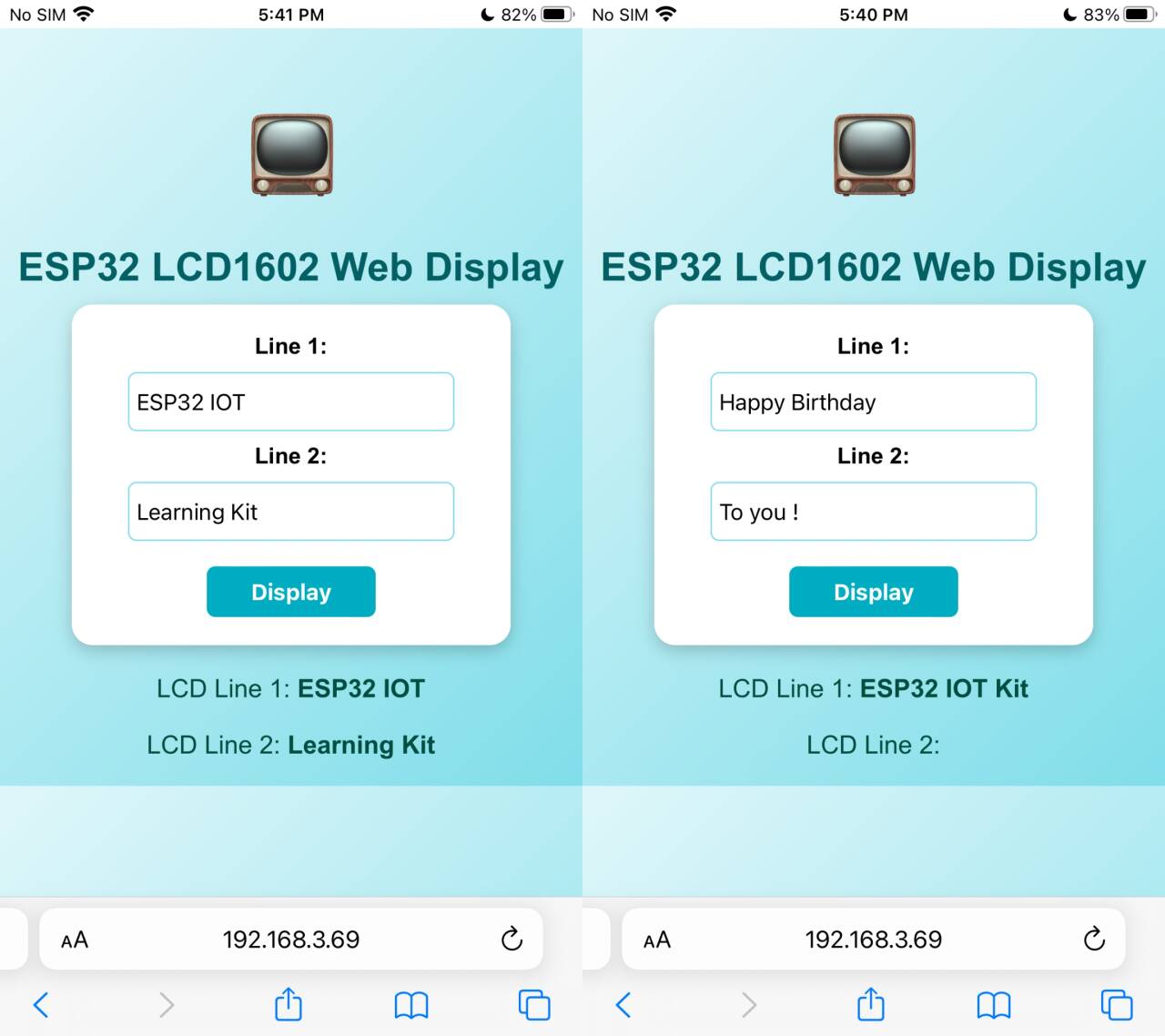
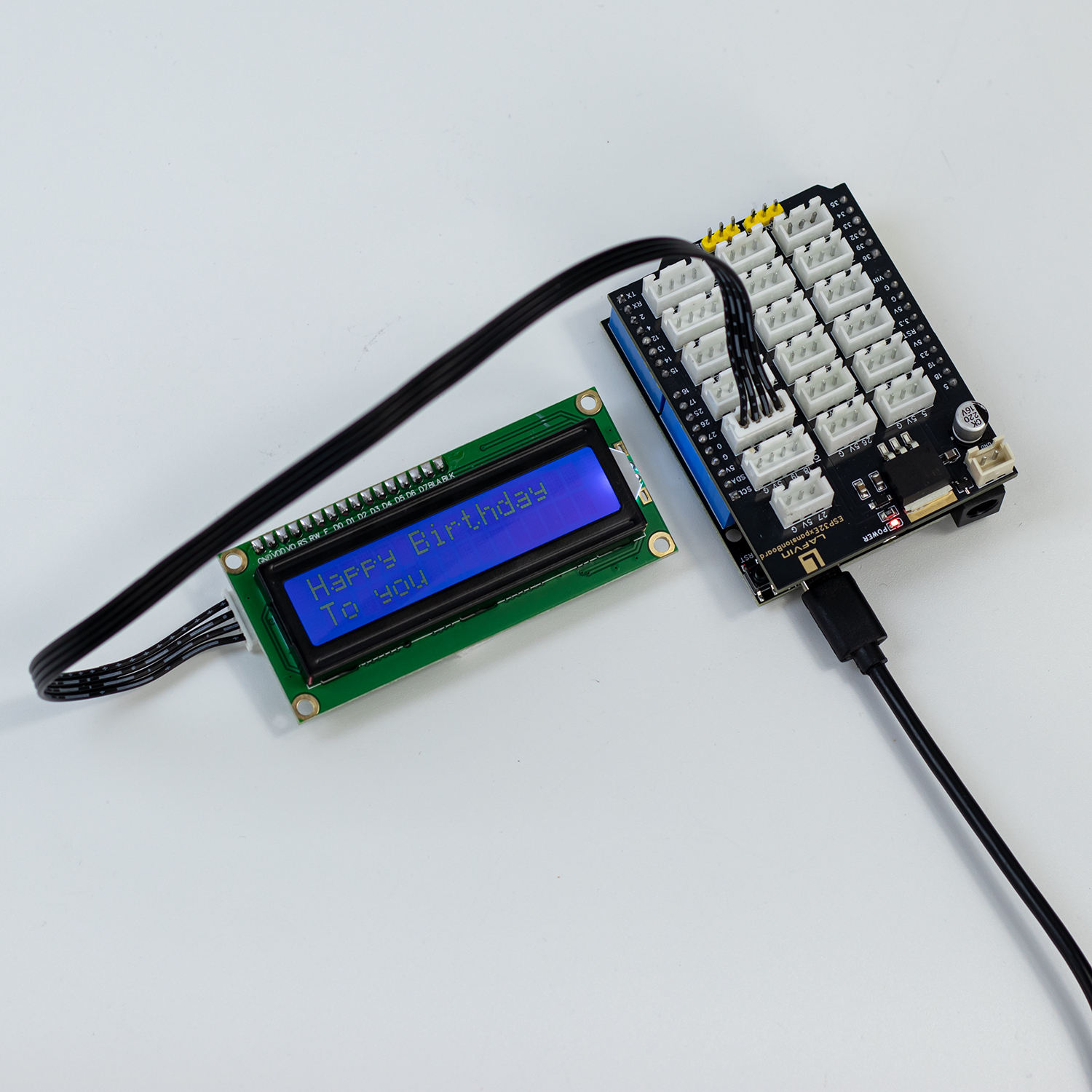
Enables text input via webpage and dynamic display on the LCD1602 LCD screen.
Masters core technologies such as I2C communication and display control.
Required Component
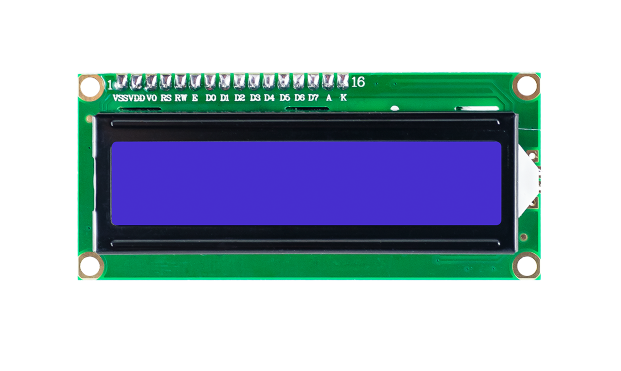
LCD 1602 Screen
Working Principle
The LCD1602 is a character-type liquid crystal display module that can display two lines, each with 16 characters. It integrates a control chip to receive instructions and data from the microcontroller and control the content displayed on the LCD screen.
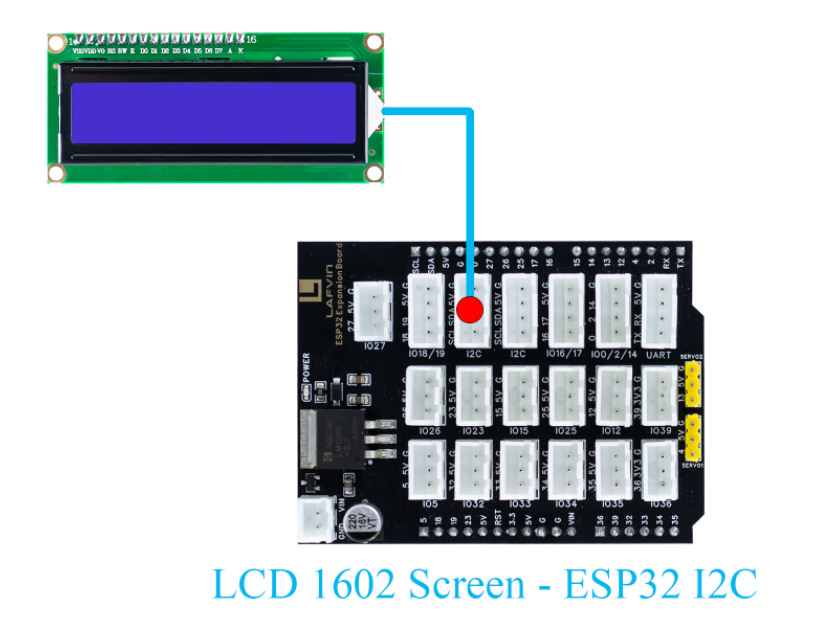
Wiring
LCD 1602 Screen —— ESP32 I2C
Example Code
#include <WiFi.h>
#include <WebServer.h>
#include <LiquidCrystal_I2C.h>
#include <Preferences.h>

// ====== Initialize LCD1602 (address 0x27, 16 columns 2 rows) ======
LiquidCrystal_I2C lcd(0x27, 16, 2);

// ====== Create Web Server ======
WebServer server(80);

// ====== LCD Display Content Variables ======
String line1 = "";
String line2 = "";

// ====== WiFi Configuration ======
const char* apSSID = "LCD_Display";  // Access Point SSID (no password)
const char* apPassword = NULL;          // No password

String wifiSSID = "";        // Store target WiFi SSID
String wifiPassword = "";    // Store target WiFi password

bool isConfigMode = true;    // Configuration mode flag
bool wifiConnected = false;  // WiFi connection status

// ====== Preferences for storing WiFi credentials ======
Preferences preferences;

// ====== URL Decode Function (handle %20 etc encoding) ======
String URLDecode(String input) {
  String decoded = "";
  char temp[] = "00";
  unsigned int len = input.length();
  unsigned int i = 0;
  while (i < len) {
    char c = input[i];
    if (c == '+') decoded += ' ';
    else if (c == '%' && i + 2 < len) {
      temp[0] = input[i + 1];
      temp[1] = input[i + 2];
      char decodedChar = (char) strtol(temp, NULL, 16);
      decoded += decodedChar;
      i += 2;
    } else decoded += c;
    i++;
  }
  return decoded;
}

// ====== HTML Configuration Page ======
String configHTMLPage() {
  String html = R"(
<!DOCTYPE html>
<html>
<head>
<meta charset="UTF-8">
<meta name="viewport" content="width=device-width, initial-scale=1.0">
<title>ESP32 WiFi Configuration</title>
<style>
  body {
    font-family: "Segoe UI", Arial, sans-serif;
    background: linear-gradient(135deg, #e0f7fa, #80deea);
    text-align: center;
    margin-top: 50px;
  }
  .container {
    background: white;
    display: inline-block;
    padding: 30px 40px;
    border-radius: 15px;
    box-shadow: 0 4px 12px rgba(0,0,0,0.2);
  }
  h2 { color: #006064; font-size: 28px; margin-bottom: 20px; }
  input[type='text'], input[type='password'] {
    width: 220px;
    height: 30px;
    font-size: 16px;
    padding: 5px;
    margin: 8px 0;
    border: 1px solid #80deea;
    border-radius: 6px;
    outline: none;
  }
  input[type='submit'] {
    width: 120px;
    height: 36px;
    background-color: #00acc1;
    border: none;
    color: white;
    font-size: 16px;
    border-radius: 6px;
    cursor: pointer;
    margin-top: 10px;
  }
  input[type='submit']:hover { background-color: #00838f; }
</style>
</head>
<body>
  <div class="container">
    <h2>WiFi Configuration</h2>
    <form action="/configure" method="POST">
      <div>
        <label><b>WiFi SSID:</b></label><br>
        <input type="text" name="ssid" placeholder="Enter WiFi SSID" required>
      </div>
      <div>
        <label><b>WiFi Password:</b></label><br>
        <input type="password" name="password" placeholder="Enter WiFi Password" required>
      </div>
      <input type="submit" value="Connect">
    </form>
  </div>
</body>
</html>
)";
  return html;
}

// ====== Generate Webpage HTML ======
String controlHTMLPage(String msg1, String msg2) {
  String html = R"(
<!DOCTYPE html>
<html>
<head>
<meta charset="UTF-8">
<meta name="viewport" content="width=device-width, initial-scale=1.0">
<title>ESP32 LCD1602 Controller</title>
<style>
  body {
    font-family: "Segoe UI", Arial, sans-serif;
    background: linear-gradient(135deg, #e0f7fa, #80deea);
    text-align: center;
    margin-top: 50px;
  }
  h2 { color: #006064; font-size: 28px; margin-bottom: 10px; }
  form {
    background: white;
    display: inline-block;
    padding: 20px 40px;
    border-radius: 15px;
    box-shadow: 0 4px 12px rgba(0,0,0,0.2);
  }
  input[type='text'] {
    width: 220px;
    height: 30px;
    font-size: 16px;
    padding: 5px;
    margin: 8px 0;
    border: 1px solid #80deea;
    border-radius: 6px;
    outline: none;
  }
  input[type='submit'] {
    width: 120px;
    height: 36px;
    background-color: #00acc1;
    border: none;
    color: white;
    font-size: 16px;
    border-radius: 6px;
    cursor: pointer;
    margin-top: 10px;
  }
  input[type='submit']:hover { background-color: #00838f; }
  .status { margin-top: 20px; color: #004d40; font-size: 18px; }
  .icon { font-size: 60px; color: #0097a7; margin-bottom: 10px; }
</style>
</head>
<body>
  <div class="icon">📺</div>
  <h2>ESP32 LCD1602 Web Display</h2>
  <form action="/" method="GET">
    <div>
      <label><b>Line 1:</b></label><br>
      <input type="text" name="line1" maxlength="16" placeholder="Enter text for line 1">
    </div>
    <div>
      <label><b>Line 2:</b></label><br>
      <input type="text" name="line2" maxlength="16" placeholder="Enter text for line 2">
    </div>
    <input type="submit" value="Display">
  </form>
  <div class="status">
    <p>LCD Line 1: <b>)" + msg1 + R"(</b></p>
    <p>LCD Line 2: <b>)" + msg2 + R"(</b></p>
  </div>
</body>
</html>
)";
  return html;
}

// ====== Route Handlers ======
void handleRoot() {
  if (isConfigMode) {
    server.send(200, "text/html", configHTMLPage());
  } else {
    // Check for GET parameters
    if (server.hasArg("line1") || server.hasArg("line2")) {
      line1 = server.arg("line1");
      line2 = server.arg("line2");

      line1.replace("+", " ");
      line2.replace("+", " ");

      line1 = URLDecode(line1);
      line2 = URLDecode(line2);

      Serial.println("Line1: " + line1);
      Serial.println("Line2: " + line2);

      lcd.clear();
      lcd.setCursor(0, 0);
      lcd.print(line1.substring(0, 16));
      lcd.setCursor(0, 1);
      lcd.print(line2.substring(0, 16));
    }
    server.send(200, "text/html", controlHTMLPage(line1, line2));
  }
}

void handleConfigure() {
  wifiSSID = server.arg("ssid");
  wifiPassword = server.arg("password");

  // Save credentials to preferences
  preferences.putString("ssid", wifiSSID);
  preferences.putString("password", wifiPassword);

  server.send(200, "text/html",
              "<html><body><h2>Connecting to WiFi...</h2>"
              "<p>SSID: " + wifiSSID + "</p>"
              "<p>Device will restart and attempt connection.</p>"
              "<script>setTimeout(() => { location.href = '/'; }, 3000);</script>"
              "</body></html>");

  delay(2000);
  ESP.restart();
}

// ====== Connect to WiFi ======
bool connectToWiFi() {
  if (wifiSSID == "") return false;

  Serial.println("Attempting to connect to WiFi: " + wifiSSID);
  WiFi.begin(wifiSSID.c_str(), wifiPassword.c_str());

  int attempts = 0;
  while (WiFi.status() != WL_CONNECTED && attempts < 20) {
    delay(500);
    Serial.print(".");
    attempts++;
  }

  if (WiFi.status() == WL_CONNECTED) {
    Serial.println("\nWiFi connected successfully!");
    Serial.println("IP address: " + WiFi.localIP().toString());
    return true;
  } else {
    Serial.println("\nFailed to connect to WiFi");
    return false;
  }
}

// ====== Setup Access Point ======
void setupAccessPoint() {
  Serial.println("Setting up Access Point...");
  WiFi.softAP(apSSID, apPassword);
  Serial.println("Access Point started");
  Serial.println("SSID: " + String(apSSID));
  Serial.println("Password: None (Open Network)");
  Serial.println("IP address: " + WiFi.softAPIP().toString());
}

void setup() {
  Serial.begin(115200);

  // Initialize LCD
  lcd.init();
  lcd.backlight();
  lcd.clear();
  lcd.setCursor(0, 0);
  lcd.print("Initializing...");

  // Initialize preferences
  preferences.begin("wifi-config", false);

  // Try to load saved WiFi credentials
  wifiSSID = preferences.getString("ssid", "");
  wifiPassword = preferences.getString("password", "");

  Serial.println("=== ESP32 LCD1602 Controller ===");

  if (wifiSSID != "" && connectToWiFi()) {
    // Successfully connected to WiFi
    isConfigMode = false;
    wifiConnected = true;
    Serial.println("Mode: Station (Connected to WiFi)");

    lcd.clear();
    lcd.setCursor(0, 0);
    lcd.print("WiFi Connected!");
    lcd.setCursor(0, 1);
    lcd.print(WiFi.localIP().toString());
  } else {
    // Enter configuration mode (Access Point)
    isConfigMode = true;
    wifiConnected = false;
    setupAccessPoint();
    Serial.println("Mode: Access Point (Configuration)");

    lcd.clear();
    lcd.setCursor(0, 0);
    lcd.print("AP: " + String(apSSID));
    lcd.setCursor(0, 1);
    lcd.print("Config Mode");
  }

  // Web server routes
  server.on("/", handleRoot);
  server.on("/configure", HTTP_POST, handleConfigure);

  server.begin();
  Serial.println("Web server started");
}

void loop() {
  server.handleClient();
}
Code burning options
You can directly copy the code provided above into the Arduino IDE for burning.
Find the 7.LCD_Display.ino file in the provided folder, download it, open it with the Arduino IDE, and burn the program to the ESP32 development board.
Find the 7.LCD_Display.bin file in the provided folder, download it and use Flash Download Tool to flash the program to the ESP32 development board.
Effects Demonstration
You can enter custom text content on the webpage, and it will be displayed on the LCD1602 screen in real time.
Each line can contain a maximum of 16 characters(including spaces), and any lines exceeding this limit will be automatically truncated.