Course 3:Servo_Control
Learning Objectives
By controlling the rotation of the SG90 servo, one can master the basic working principle of servos and the PWM control method, and achieve precise control of the servo’s rotation angle.
Required Component
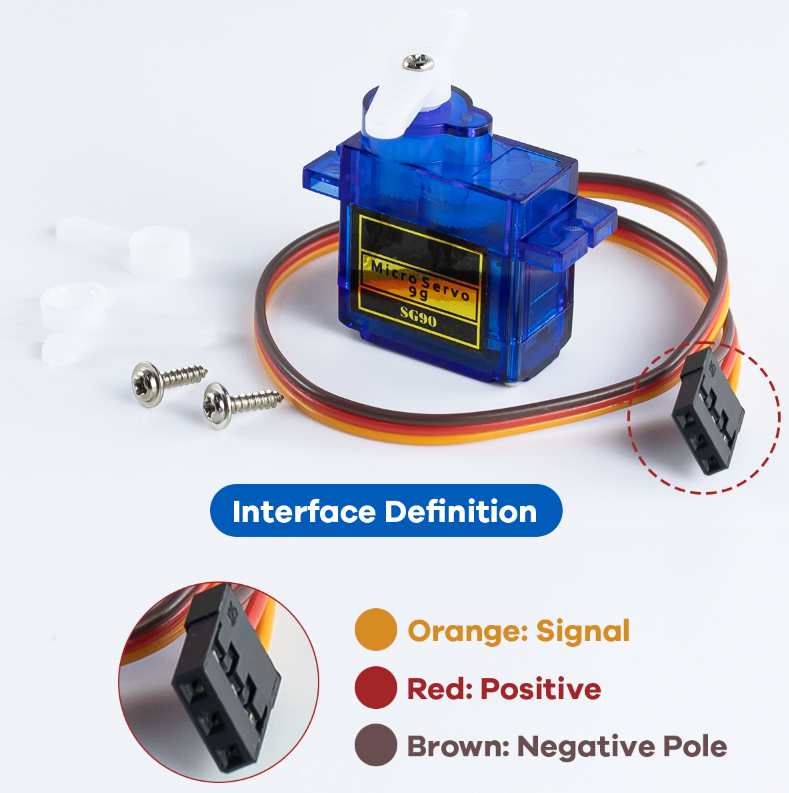
SG90 Servo
Working Principle
The SG90 servo receives PWM pulse width signals from the controller and uses internal potentiometer feedback to achieve closed-loop control of the motor, thereby precisely adjusting and maintaining a specified angle.
The ESP32 sends a PWM signal with a period of approximately 20ms(50Hz)to the servo motor.The pulse width(high-level time)determines the servo motor’s rotation angle: 0.5ms - 0 degrees, 1.5ms - 90 degrees, 2.5ms - 180 degrees.
Wiring
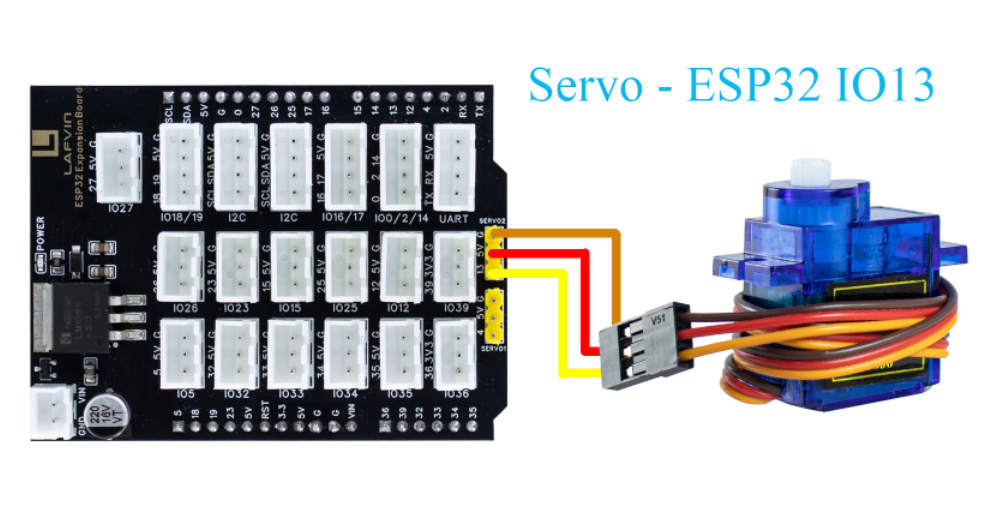
SG90 Servo —— ESP32 IO13
Example Code
  1#include <WiFi.h>
  2#include <WebServer.h>
  3#include <ESP32Servo.h>
  4#include <Preferences.h>
  5
  6// ===== Servo Configuration =====
  7#define SERVO_PIN 13
  8Servo servo;
  9int currentAngle = 0;  // Initial angle (power-on reset)
 10
 11// ===== WiFi Configuration =====
 12const char* apSSID = "Servo_Control";  // Access Point SSID
 13const char* apPassword = NULL;         // No password
 14
 15String wifiSSID = "";        // Store target WiFi SSID
 16String wifiPassword = "";    // Store target WiFi password
 17
 18bool isConfigMode = true;    // Configuration mode flag
 19bool wifiConnected = false;  // WiFi connection status
 20
 21// ===== Web Server =====
 22WebServer server(80);
 23
 24// ===== Preferences for storing WiFi credentials =====
 25Preferences preferences;
 26
 27// ===== HTML Configuration Page =====
 28String configHTMLPage() {
 29  String page = R"rawliteral(
 30<!DOCTYPE html>
 31<html lang="en">
 32<head>
 33<meta charset="UTF-8">
 34<meta name="viewport" content="width=device-width, initial-scale=1.0">
 35<title>ESP32 WiFi Configuration</title>
 36<style>
 37  body {
 38    font-family: "Segoe UI", Arial, sans-serif;
 39    background: linear-gradient(135deg, #e3f2fd, #bbdefb);
 40    display: flex;
 41    justify-content: center;
 42    align-items: center;
 43    height: 100vh;
 44  }
 45  .card {
 46    background: white;
 47    border-radius: 16px;
 48    box-shadow: 0 6px 16px rgba(0,0,0,0.2);
 49    padding: 30px;
 50    text-align: center;
 51    width: 90%;
 52    max-width: 400px;
 53  }
 54  h2 {
 55    color: #1565c0;
 56    margin-bottom: 20px;
 57  }
 58  input {
 59    width: 100%;
 60    padding: 12px;
 61    margin: 10px 0;
 62    border: 1px solid #ddd;
 63    border-radius: 8px;
 64    box-sizing: border-box;
 65    font-size: 16px;
 66  }
 67  button {
 68    width: 100%;
 69    padding: 12px;
 70    margin-top: 10px;
 71    font-size: 16px;
 72    border-radius: 8px;
 73    border: none;
 74    background-color: #1976d2;
 75    color: white;
 76    cursor: pointer;
 77  }
 78  button:hover {
 79    background-color: #0d47a1;
 80  }
 81</style>
 82</head>
 83<body>
 84  <div class="card">
 85    <h2>WiFi Configuration</h2>
 86    <form action='/configure' method='POST'>
 87      <input type='text' name='ssid' placeholder='WiFi SSID' required>
 88      <input type='password' name='password' placeholder='WiFi Password' required>
 89      <button type='submit'>Connect</button>
 90    </form>
 91  </div>
 92</body>
 93</html>
 94)rawliteral";
 95  return page;
 96}
 97
 98// ===== HTML Control Page =====
 99String controlHTMLPage(int angle) {
100  String page = R"rawliteral(
101<!DOCTYPE html>
102<html lang="en">
103<head>
104<meta charset="UTF-8">
105<meta name="viewport" content="width=device-width, initial-scale=1.0">
106<title>ESP32 Servo Controller</title>
107<style>
108  body {
109    font-family: "Segoe UI", Arial, sans-serif;
110    background: linear-gradient(135deg, #e3f2fd, #bbdefb);
111    display: flex;
112    justify-content: center;
113    align-items: center;
114    height: 100vh;
115  }
116  .card {
117    background: white;
118    border-radius: 16px;
119    box-shadow: 0 6px 16px rgba(0,0,0,0.2);
120    padding: 30px;
121    text-align: center;
122  }
123  h2 {
124    color: #1565c0;
125    margin-bottom: 20px;
126  }
127  .knob-container {
128    position: relative;
129    width: 200px;
130    height: 200px;
131    margin: 0 auto;
132  }
133  .knob {
134    width: 100%;
135    height: 100%;
136    border-radius: 50%;
137    background: radial-gradient(circle at 30% 30%, #fff, #90caf9);
138    box-shadow: inset 0 0 10px rgba(0,0,0,0.3);
139    transform: rotate(0deg);
140    transition: transform 0.2s linear;
141  }
142  .indicator {
143    position: absolute;
144    top: 10px;
145    left: 50%;
146    width: 4px;
147    height: 80px;
148    background: #0d47a1;
149    transform-origin: bottom center;
150    transform: rotate(0deg);
151    border-radius: 2px;
152  }
153  .angle-display {
154    font-size: 22px;
155    color: #0d47a1;
156    margin-top: 20px;
157  }
158  input[type="range"] {
159    width: 100%;
160    margin-top: 20px;
161    accent-color: #1565c0;
162  }
163  .btn-group {
164    margin-top: 20px;
165  }
166  button {
167    padding: 10px 18px;
168    margin: 0 6px;
169    font-size: 16px;
170    border-radius: 8px;
171    border: none;
172    background-color: #1976d2;
173    color: white;
174    cursor: pointer;
175  }
176  button:hover {
177    background-color: #0d47a1;
178  }
179</style>
180</head>
181<body>
182  <div class="card">
183    <h2>ESP32 Servo Web Controller</h2>
184    <div class="knob-container">
185      <div class="knob" id="knob">
186        <div class="indicator" id="indicator"></div>
187      </div>
188    </div>
189    <div class="angle-display">Angle: <span id="angleValue">0</span>°</div>
190    <input type="range" id="angleSlider" min="0" max="180" value="0">
191    <div class="btn-group">
192      <button onclick="setAngle(0)">Reset</button>
193      <button onclick="setAngle(90)">90°</button>
194      <button onclick="setAngle(180)">180°</button>
195    </div>
196  </div>
197
198<script>
199  let angle = )rawliteral";
200  page += String(angle);
201  page += R"rawliteral(;
202  const slider = document.getElementById('angleSlider');
203  const angleValue = document.getElementById('angleValue');
204  const knob = document.getElementById('knob');
205  const indicator = document.getElementById('indicator');
206
207  function updateUI() {
208    angleValue.textContent = angle;
209    indicator.style.transform = 'rotate(' + angle + 'deg)';
210    knob.style.transform = 'rotate(' + angle + 'deg)';
211    slider.value = angle;
212  }
213
214  function setAngle(newAngle) {
215    angle = newAngle;
216    updateUI();
217    fetch('/set?angle=' + angle);
218  }
219
220  slider.addEventListener('input', () => {
221    angle = slider.value;
222    updateUI();
223    fetch('/set?angle=' + angle);
224  });
225
226  updateUI();
227</script>
228</body>
229</html>
230)rawliteral";
231  return page;
232}
233
234// ===== Route Handlers =====
235void handleRoot() {
236  if (isConfigMode) {
237    server.send(200, "text/html", configHTMLPage());
238  } else {
239    server.send(200, "text/html", controlHTMLPage(currentAngle));
240  }
241}
242
243void handleSet() {
244  if (server.hasArg("angle")) {
245    int newAngle = server.arg("angle").toInt();
246    newAngle = constrain(newAngle, 0, 180);
247    currentAngle = newAngle;
248    servo.write(currentAngle);
249    Serial.printf("Servo angle set to %d°\n", currentAngle);
250  }
251  server.send(200, "text/plain", "OK");
252}
253
254void handleConfigure() {
255  wifiSSID = server.arg("ssid");
256  wifiPassword = server.arg("password");
257  preferences.putString("ssid", wifiSSID);
258  preferences.putString("password", wifiPassword);
259  server.send(200, "text/html", "<html><body><h2>Connecting to WiFi...</h2>"
260              "<p>SSID: " + wifiSSID + "</p>"
261              "<p>Device will restart and attempt connection.</p>"
262              "<script>setTimeout(() => { location.href = '/'; }, 3000);</script>"
263              "</body></html>");
264  delay(2000);
265  ESP.restart();
266}
267
268bool connectToWiFi() {
269  if (wifiSSID == "") return false;
270  Serial.println("Attempting to connect to WiFi: " + wifiSSID);
271  WiFi.begin(wifiSSID.c_str(), wifiPassword.c_str());
272  int attempts = 0;
273  while (WiFi.status() != WL_CONNECTED && attempts < 20) {
274    delay(500);
275    Serial.print(".");
276    attempts++;
277  }
278  if (WiFi.status() == WL_CONNECTED) {
279    Serial.println("\nWiFi connected successfully!");
280    Serial.println("IP address: " + WiFi.localIP().toString());
281    return true;
282  } else {
283    Serial.println("\nFailed to connect to WiFi");
284    return false;
285  }
286}
287
288void setupAccessPoint() {
289  Serial.println("Setting up Access Point...");
290  WiFi.softAP(apSSID, apPassword);
291  Serial.println("Access Point started");
292  Serial.println("SSID: " + String(apSSID));
293  Serial.println("Password: None (Open Network)");
294  Serial.println("IP address: " + WiFi.softAPIP().toString());
295}
296
297void setup() {
298  Serial.begin(115200);
299  servo.attach(SERVO_PIN);
300  currentAngle = 0;
301  servo.write(currentAngle);
302  Serial.println("Servo reset to 0°");
303
304  preferences.begin("wifi-config", false);
305  wifiSSID = preferences.getString("ssid", "");
306  wifiPassword = preferences.getString("password", "");
307  Serial.println("=== ESP32 Servo Controller ===");
308
309  if (wifiSSID != "" && connectToWiFi()) {
310    isConfigMode = false;
311    wifiConnected = true;
312    Serial.println("Mode: Station (Connected to WiFi)");
313  } else {
314    isConfigMode = true;
315    wifiConnected = false;
316    setupAccessPoint();
317    Serial.println("Mode: Access Point (Configuration)");
318  }
319
320  server.on("/", handleRoot);
321  server.on("/set", handleSet);
322  server.on("/configure", HTTP_POST, handleConfigure);
323  server.begin();
324  Serial.println("Web server started.");
325}
326
327void loop() {
328  server.handleClient();
329}
Code burning options
You can directly copy the code provided above into the Arduino IDE for burning.
Find the 3.Servo_Control.ino file in the provided folder, download it, open it with the Arduino IDE, and burn the program to the ESP32 development board.
Find the 3.Servo_Control.bin file in the provided folder, download it and use Flash Download Tool to flash the program to the ESP32 development board.
Effects Demonstration
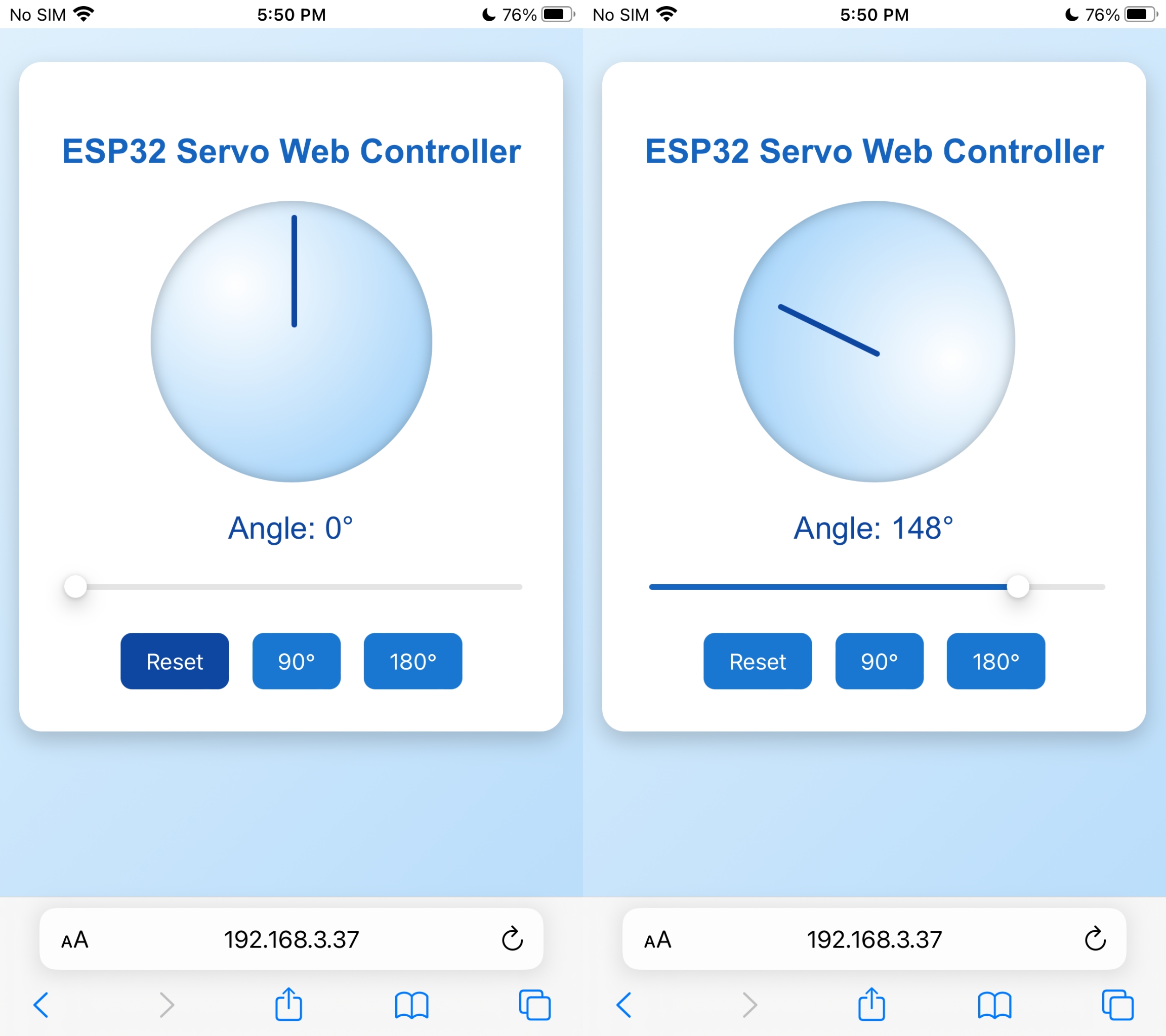
After opening the web control interface, drag the slider to control the servo’s rotation angle.
Click the three preset angle buttons at the bottom, and the servo will automatically rotate to the corresponding angle position.