Course 10:Env_Detector
Learning Objectives
Learn environmental sensor data acquisition techniques, master the use of DHT11, photosensors, and raindrop sensors, and understand JSON data communication.
Learn to achieve multi-source data acquisition through ADC analog input and digital signal reading.
Required Component
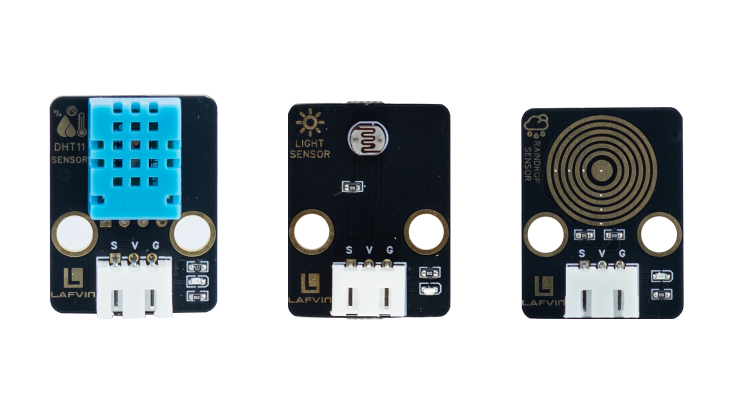
DHT11 Sensor、Light Sensor、Raindrop Sensor
Working Principle
Light Sensor:The core component of a photosensitive brightness sensor is a photoresistor, a semiconductor device whose resistance changes with light intensity. When the light intensity increases, photons are absorbed by the material, generating more free electrons, thus reducing resistance and increasing current; when the light intensity decreases, the number of free electrons decreases, increasing resistance and decreasing current.
Raindrop Sensor:A rain sensor mainly consists of a sensing plate and a comparison module(signal processing circuit). The surface of the sensing plate has a layer of conductive lines. When water droplets fall on the surface, the conductive liquid(water)creates a path between the electrodes, resulting in a decrease in resistance and an increase in current.
Wiring
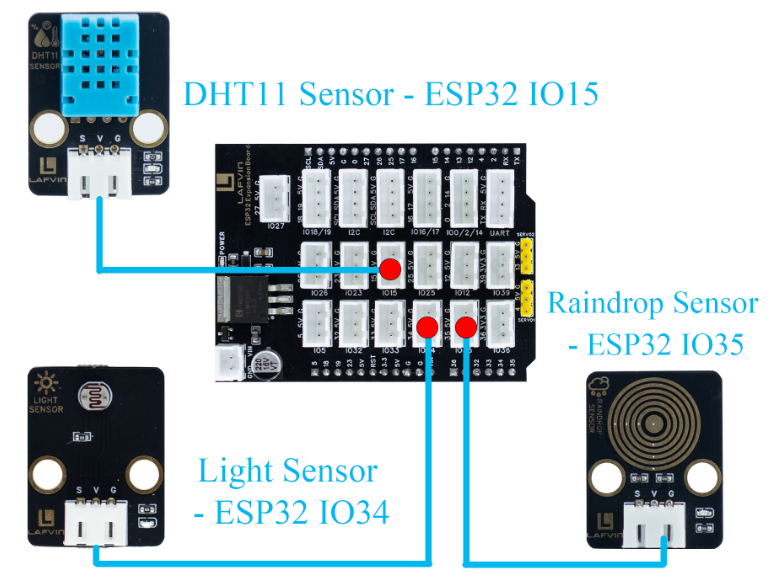
DHT11 Sensor —— ESP32 IO15
Light Sensor —— ESP32 IO34
Raindrop Sensor —— ESP32 IO35
Example Code
#include <WiFi.h>
#include <WebServer.h>
#include <DHT.h>
#include <Preferences.h>

// ===== Pin Definitions =====
#define DHTPIN 15
#define DHTTYPE DHT11
#define LIGHT_PIN 34
#define RAIN_PIN 35

DHT dht(DHTPIN, DHTTYPE);
WebServer server(80);

// ===== Sensor Data =====
float temperature = 0;
float humidity = 0;
int lightPercent = 0;
int rainPercent = 0;

// ===== WiFi Configuration =====
const char* apSSID = "Env_Detector";  // Access Point SSID (no password)
const char* apPassword = NULL;        // No password

String wifiSSID = "";        // Store target WiFi SSID
String wifiPassword = "";    // Store target WiFi password

bool isConfigMode = true;    // Configuration mode flag
bool wifiConnected = false;  // WiFi connection status

// ===== Preferences for storing WiFi credentials =====
Preferences preferences;

// ===== Read Sensors =====
void readSensors() {
  temperature = dht.readTemperature();
  humidity = dht.readHumidity();

  int lightVal = analogRead(LIGHT_PIN);
  lightPercent = map(lightVal, 0, 4095, 0, 100);
  if(lightPercent>100) lightPercent=100;

  int rainVal = analogRead(RAIN_PIN);
  rainPercent = map(rainVal, 0, 4095, 0, 100);
  if(rainPercent>100) rainPercent=100;
}

// ===== Return Data JSON =====
void handleData() {
  readSensors();
  String json = "{";
  json += "\"temperature\":" + String(temperature) + ",";
  json += "\"humidity\":" + String(humidity) + ",";
  json += "\"light\":" + String(lightPercent) + ",";
  json += "\"rain\":" + String(rainPercent);
  json += "}";
  server.send(200,"application/json",json);
}

// ===== HTML Configuration Page =====
String configHTMLPage() {
  return R"rawliteral(
<!DOCTYPE html>
<html lang="en">
<head>
<meta charset="UTF-8">
<meta name="viewport" content="width=device-width, initial-scale=1.0">
<title>ESP32 WiFi Configuration</title>
<style>
body {
  font-family:'Segoe UI', sans-serif;
  background:#f0f2f5;
  color:#333;
  margin:0;
  padding:20px;
  display: flex;
  justify-content: center;
  align-items: center;
  min-height: 100vh;
}
.container {
  background: white;
  padding: 30px;
  border-radius: 15px;
  box-shadow: 0 4px 20px rgba(0,0,0,0.1);
  width: 90%;
  max-width: 400px;
  text-align: center;
}
h1 {
  margin-bottom: 30px;
  color:#444;
}
input {
  width: 100%;
  padding: 12px;
  margin: 10px 0;
  border: 1px solid #ccc;
  border-radius: 8px;
  box-sizing: border-box;
  font-size: 16px;
}
button {
  width: 100%;
  padding: 12px;
  margin-top: 15px;
  font-size: 16px;
  background-color: #0078d7;
  color: white;
  border: none;
  border-radius: 8px;
  cursor: pointer;
  transition: 0.3s;
}
button:hover {
  background-color: #005cbf;
}
</style>
</head>
<body>
  <div class="container">
    <h1>WiFi Configuration</h1>
    <form action="/configure" method="POST">
      <input type="text" name="ssid" placeholder="WiFi SSID" required>
      <input type="password" name="password" placeholder="WiFi Password" required>
      <button type="submit">Connect</button>
    </form>
  </div>
</body>
</html>
)rawliteral";
}

// ===== Control Web Page =====
String controlHTMLPage() {
  return R"rawliteral(
<!DOCTYPE html>
<html lang="en">
<head>
<meta charset="UTF-8">
<meta name="viewport" content="width=device-width, initial-scale=1.0">
<title>ESP32 Environment Detection System</title>
<style>
body { font-family:'Segoe UI', sans-serif; background:#f0f2f5; color:#333; margin:0; padding:20px; }
h1 { text-align:center; margin-bottom:40px; color:#444; }
.sensor { margin-bottom:30px; display:flex; align-items:center; gap:15px; }
.label { font-weight:bold; width:150px; }
.icon { font-size:28px; width:30px; text-align:center; }
.progress-container { background:#ddd; border-radius:25px; overflow:hidden; flex:1; height:30px; position:relative; }
.progress-bar { height:100%; width:0%; line-height:30px; color:#fff; text-align:center; font-weight:bold; transition: width 0.5s ease; border-radius:20px; position:relative; z-index:2; }

/* Background glow */
.progress-container::before {
  content:"";
  position:absolute;
  left:0; top:0; width:100%; height:100%;
  border-radius:25px;
  background: radial-gradient(circle, rgba(255,255,255,0.2) 0%, transparent 70%);
  z-index:1;
  pointer-events:none;
}
</style>
<link rel="stylesheet" href="https://cdnjs.cloudflare.com/ajax/libs/font-awesome/6.4.0/css/all.min.css">
</head>
<body>
<h1>ESP32 Environment Detection System</h1>

<div class="sensor">
  <div class="icon" id="iconTemp"><i class="fas fa-temperature-high"></i></div>
  <div class="label" id="labelTemp">Temperature: 0°C</div>
  <div class="progress-container"><div id="barTemp" class="progress-bar">0°C</div></div>
</div>

<div class="sensor">
  <div class="icon" id="iconHum"><i class="fas fa-tint"></i></div>
  <div class="label" id="labelHum">Humidity: 0%</div>
  <div class="progress-container"><div id="barHum" class="progress-bar">0%</div></div>
</div>

<div class="sensor">
  <div class="icon" id="iconLight"><i class="fas fa-sun"></i></div>
  <div class="label" id="labelLight">Light: 0%</div>
  <div class="progress-container"><div id="barLight" class="progress-bar">0%</div></div>
</div>

<div class="sensor">
  <div class="icon" id="iconRain"><i class="fas fa-cloud-rain"></i></div>
  <div class="label" id="labelRain">Rain: 0%</div>
  <div class="progress-container"><div id="barRain" class="progress-bar">0%</div></div>
</div>

<script>
function updateBars(){
  fetch('/data').then(res=>res.json()).then(data=>{
    // Temperature
    let tPercent = Math.min(data.temperature*2, 100);
    document.getElementById('barTemp').style.width = tPercent+'%';
    document.getElementById('barTemp').innerText = data.temperature+'°C';
    document.getElementById('labelTemp').innerText = 'Temperature: '+data.temperature+'°C';
    document.getElementById('barTemp').style.background = '#FF3333'; // Red
    document.getElementById('iconTemp').style.color = '#FF3333';

    // Humidity
    let hPercent = data.humidity;
    document.getElementById('barHum').style.width = hPercent+'%';
    document.getElementById('barHum').innerText = data.humidity+'%';
    document.getElementById('labelHum').innerText = 'Humidity: '+data.humidity+'%';
    document.getElementById('barHum').style.background = '#5EB8FF'; // Light blue
    document.getElementById('iconHum').style.color = '#5EB8FF';

    // Light
    let lPercent = data.light;
    document.getElementById('barLight').style.width = lPercent+'%';
    document.getElementById('barLight').innerText = data.light+'%';
    document.getElementById('labelLight').innerText = 'Light: '+data.light+'%';
    document.getElementById('barLight').style.background = '#FFD700'; // Yellow
    document.getElementById('iconLight').style.color = '#FFD700';

    // Rain
    let rPercent = data.rain;
    document.getElementById('barRain').style.width = rPercent+'%';
    document.getElementById('barRain').innerText = data.rain+'%';
    document.getElementById('labelRain').innerText = 'Rain: '+data.rain+'%';
    document.getElementById('barRain').style.background = '#0044CC'; // Dark blue
    document.getElementById('iconRain').style.color = '#0044CC';
  });
}

setInterval(updateBars,1000);
updateBars();
</script>
</body>
</html>
)rawliteral";
}

// ===== Route Handlers =====
void handleRoot() {
  if (isConfigMode) {
    server.send(200, "text/html", configHTMLPage());
  } else {
    server.send(200, "text/html", controlHTMLPage());
  }
}

void handleConfigure() {
  wifiSSID = server.arg("ssid");
  wifiPassword = server.arg("password");

  // Save credentials to preferences
  preferences.putString("ssid", wifiSSID);
  preferences.putString("password", wifiPassword);

  server.send(200, "text/html",
              "<html><body><h2>Connecting to WiFi...</h2>"
              "<p>SSID: " + wifiSSID + "</p>"
              "<p>Device will restart and attempt connection.</p>"
              "<script>setTimeout(() => { location.href = '/'; }, 3000);</script>"
              "</body></html>");

  delay(2000);
  ESP.restart();
}

// ===== Connect to WiFi =====
bool connectToWiFi() {
  if (wifiSSID == "") return false;

  Serial.println("Attempting to connect to WiFi: " + wifiSSID);
  WiFi.begin(wifiSSID.c_str(), wifiPassword.c_str());

  int attempts = 0;
  while (WiFi.status() != WL_CONNECTED && attempts < 20) {
    delay(500);
    Serial.print(".");
    attempts++;
  }

  if (WiFi.status() == WL_CONNECTED) {
    Serial.println("\nWiFi connected successfully!");
    Serial.println("IP address: " + WiFi.localIP().toString());
    return true;
  } else {
    Serial.println("\nFailed to connect to WiFi");
    return false;
  }
}

// ===== Setup Access Point =====
void setupAccessPoint() {
  Serial.println("Setting up Access Point...");
  WiFi.softAP(apSSID, apPassword);
  Serial.println("Access Point started");
  Serial.println("SSID: " + String(apSSID));
  Serial.println("Password: None (Open Network)");
  Serial.println("IP address: " + WiFi.softAPIP().toString());
}

// ===== Setup =====
void setup(){
  Serial.begin(115200);
  dht.begin();

  pinMode(LIGHT_PIN, INPUT);
  pinMode(RAIN_PIN, INPUT);

  // Initialize preferences
  preferences.begin("wifi-config", false);

  // Try to load saved WiFi credentials
  wifiSSID = preferences.getString("ssid", "");
  wifiPassword = preferences.getString("password", "");

  Serial.println("=== ESP32 Environment Detection System ===");

  if (wifiSSID != "" && connectToWiFi()) {
    // Successfully connected to WiFi
    isConfigMode = false;
    wifiConnected = true;
    Serial.println("Mode: Station (Connected to WiFi)");
  } else {
    // Enter configuration mode (Access Point)
    isConfigMode = true;
    wifiConnected = false;
    setupAccessPoint();
    Serial.println("Mode: Access Point (Configuration)");
  }

  server.on("/", handleRoot);
  server.on("/data", handleData);
  server.on("/configure", HTTP_POST, handleConfigure);
  server.begin();
  Serial.println("Web server started");
}

void loop(){
  server.handleClient();
}
Code burning options
You can directly copy the code provided above into the Arduino IDE for burning.
Find the 10.Env_Detector.ino file in the provided folder, download it, open it with the Arduino IDE, and burn the program to the ESP32 development board.
Find the 10.Env_Detector.bin file in the provided folder, download it and use Flash Download Tool to flash the program to the ESP32 development board.
Effects Demonstration
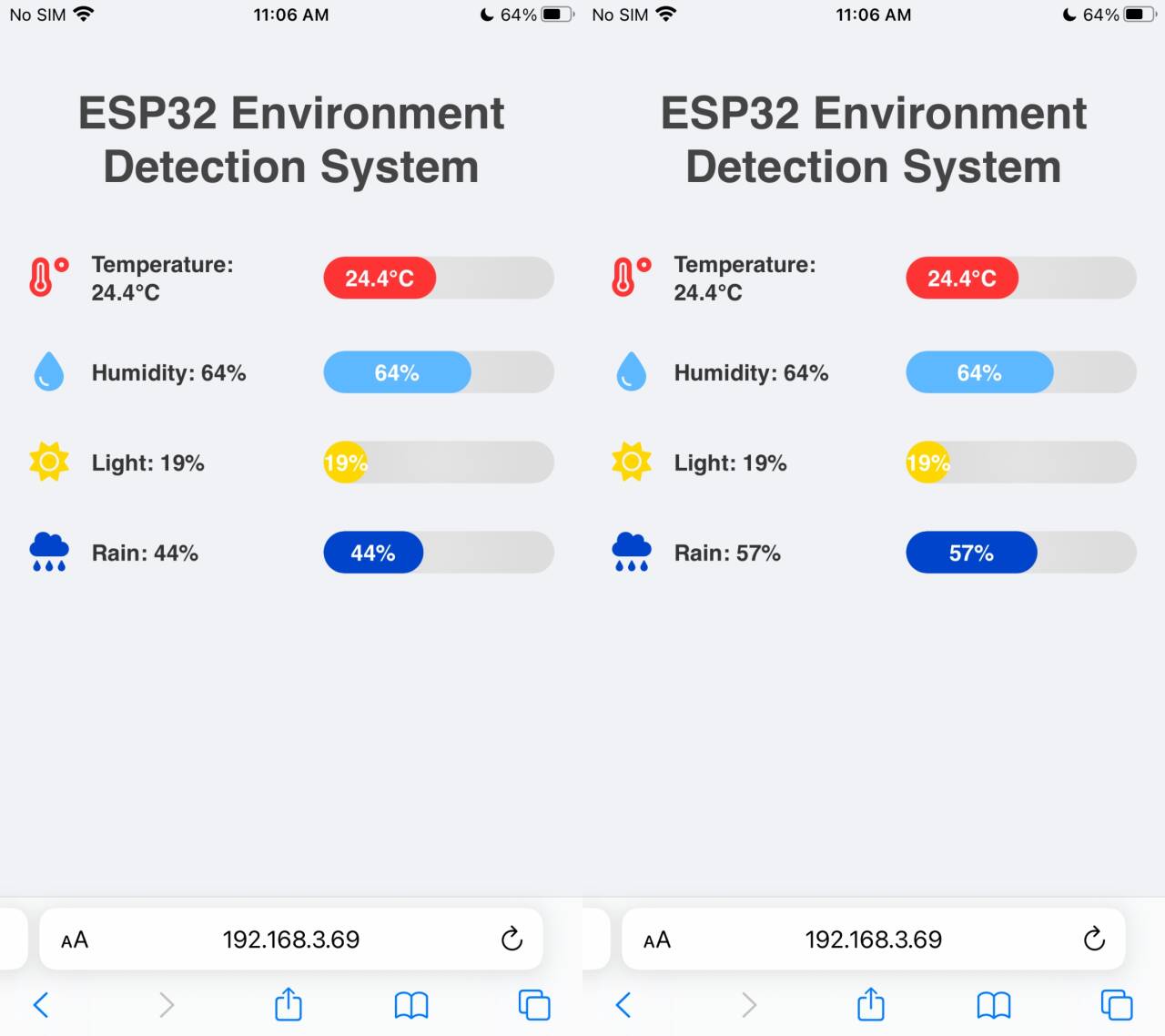
The web interface displays temperature, brightness, and raindrop values in real time.