Course 4:Fan_Control
Learning Objectives
Master the working principle and signal decoding method of infrared remote control modules;
Understand the practical application of PWM(Pulse Width Modulation)in fan speed control;
Learn multi-input control logic design(synchronization of infrared remote control and web page control signals).
Required Component
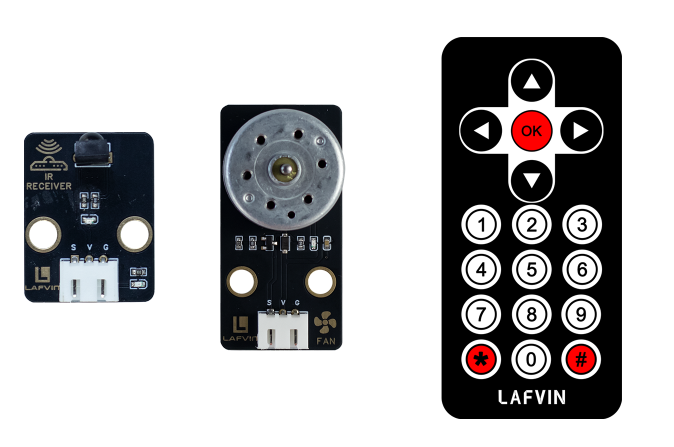
Motor Fan Module、IR Receiver Module
Working Principle
When voltage is applied across the motor, current flows through the stator coils, generating a magnetic field. This magnetic field, in turn, creates an electromagnetic torque between the rotor’s permanent magnets, driving the rotor to rotate. The rotor’s rotation then drives the fan blades, creating airflow.
The fan generates airflow by rotating a DC motor under the action of electromagnetic force. The motor speed can be controlled by adjusting the duty cycle of the PWM signal, thereby achieving wind speed regulation.
Wiring
Motor Fan Module —— ESP32 IO27
IR Receiver Module —— ESP32 IO15

Example Code
#include <WiFi.h>
#include <WebServer.h>
#include <IRremote.h>
#include <Preferences.h>

// ===== Pin Definitions =====
#define IR_RECEIVE_PIN 15
#define FAN_PIN 27

bool fanOn = false;
int fanLevel = 0;
String lastKey = "";
unsigned long lastKeyTime = 0; // Debounce timer

// ===== WiFi Configuration =====
const char* apSSID = "Fan_Control";  // Access Point SSID (no password)
const char* apPassword = NULL;       // No password

String wifiSSID = "";        // Store target WiFi SSID
String wifiPassword = "";    // Store target WiFi password

bool isConfigMode = true;    // Configuration mode flag
bool wifiConnected = false;  // WiFi connection status

// ===== Web Server =====
WebServer server(80);

// ===== Preferences for storing WiFi credentials =====
Preferences preferences;

// ===== Key Mapping =====
String keyMap(uint32_t code) {
  switch(code) {
    case 0x16: return "1";
    case 0x19: return "2";
    case 0x0d: return "3";
    case 0x40: return "OK";
    default: return "";
  }
}

// ===== Fan Control Function =====
void setFanLevel(int level, bool on = true){
  fanOn = on;
  fanLevel = (fanOn) ? level : 0;
  int duty = 0;
  if(fanOn){
    switch(fanLevel){
      case 1: duty = 85; break;
      case 2: duty = 170; break;
      case 3: duty = 255; break;
      default: duty = 0;
    }
  }
  analogWrite(FAN_PIN, duty);  // Use older ESP32 core analogWrite
}

// ===== HTML Configuration Page =====
String configHTMLPage() {
  String page = R"rawliteral(
<!DOCTYPE html>
<html lang="en">
<head>
<meta charset="UTF-8">
<meta name="viewport" content="width=device-width, initial-scale=1.0">
<title>ESP32 WiFi Configuration</title>
<style>
body {
  margin:0;
  font-family: 'Segoe UI', sans-serif;
  background: #f9f9f9;
  color: #333;
  display: flex;
  flex-direction: column;
  justify-content: center;
  align-items: center;
  min-height: 100vh;
}
.container {
  background: white;
  padding: 40px;
  border-radius: 15px;
  box-shadow: 0 5px 20px rgba(0,0,0,0.1);
  width: 90%;
  max-width: 400px;
  text-align: center;
}
h1 {
  margin-bottom: 30px;
  color: #444;
}
input {
  width: 100%;
  padding: 12px;
  margin: 10px 0;
  border: 1px solid #ddd;
  border-radius: 6px;
  box-sizing: border-box;
  font-size: 16px;
}
button {
  width: 100%;
  padding: 12px;
  background: #4CAF50;
  color: white;
  border: none;
  border-radius: 6px;
  cursor: pointer;
  font-size: 16px;
  margin-top: 10px;
}
button:hover {
  background: #45a049;
}
</style>
</head>
<body>
<div class="container">
  <h1>WiFi Configuration</h1>
  <form action='/configure' method='POST'>
    <input type='text' name='ssid' placeholder='WiFi SSID' required>
    <input type='password' name='password' placeholder='WiFi Password' required>
    <button type='submit'>Connect</button>
  </form>
</div>
</body>
</html>
)rawliteral";
  return page;
}

// ===== HTML Control Page (Original Design) =====
String controlHTMLPage() {
  return R"rawliteral(
<!DOCTYPE html>
<html lang="en">
<head>
<meta charset="UTF-8">
<meta name="viewport" content="width=device-width, initial-scale=1.0">
<title>ESP32 Fan Control</title>
<style>
body {
  margin:0;
  font-family: 'Segoe UI', sans-serif;
  background: #f9f9f9;
  color: #333;
  display: flex;
  flex-direction: column;
  justify-content: center;
  align-items: center;
  min-height: 100vh;
}
h1 {
  margin-bottom: 20px;
  color: #444;
}

/* Fan container */
.fan-container {
  position: relative;
  width: 180px;
  height: 180px;
  margin-bottom: 60px; /* Increase spacing between fan and control buttons */
  perspective: 600px;
}
.fan {
  width: 100%;
  height: 100%;
  position: relative;
}

/* Fan blades */
.blade {
  position: absolute;
  width: 18px;
  height: 80px;
  top: 50%;
  left: 50%;
  background: linear-gradient(to bottom, #fdd835 0%, #fbc02d 100%);
  border-radius: 10px 10px 5px 5px;
  transform-origin: 50% 100%; /* Rotate from bottom */
  transform: translate(-50%, -50%) rotate(0deg); /* Center and rotate */
  box-shadow: 0 2px 5px rgba(0,0,0,0.3);
}

/* Initial rotation angles */
.blade:nth-child(1) { transform: translate(-50%, -50%) rotate(0deg); }
.blade:nth-child(2) { transform: translate(-50%, -50%) rotate(120deg); }
.blade:nth-child(3) { transform: translate(-50%, -50%) rotate(240deg); }

/* Control button styles */
.toggle-switch {
  position: relative;
  display: inline-block;
  width: 60px;
  height: 34px;
  margin-right: 10px;
}
.toggle-switch input { display:none; }
.slider {
  position:absolute;
  cursor:pointer;
  top:0; left:0; right:0; bottom:0;
  background-color:#ccc;
  transition:.4s;
  border-radius:34px;
}
.slider:before {
  position:absolute;
  content:"";
  height:26px; width:26px;
  left:4px; bottom:4px;
  background-color:white;
  transition:.4s;
  border-radius:50%;
}
input:checked + .slider { background-color:#4caf50; }
input:checked + .slider:before { transform:translateX(26px); }

.controls {
  display:flex;
  align-items:center;
  margin-bottom:20px;
  gap:10px;
  flex-wrap:wrap;
}

.level-btn {
  padding:10px 18px;
  background:#2196f3;
  color:white;
  border:none;
  border-radius:6px;
  cursor:pointer;
  font-weight:bold;
  transition:0.3s;
}
.level-btn:hover { background:#1976d2; }

.level-display {
  font-size:20px;
  font-weight:bold;
  color:#f57c00;
  margin-top:10px;
}

@media(max-width:480px){
  .fan-container {width:120px;height:120px; margin-bottom:40px;}
  .blade {width:14px;height:50px;}
  .level-btn {padding:8px 14px; font-size:14px;}
  .toggle-switch {width:50px;height:28px;}
  .slider:before {height:22px;width:22px; left:3px; bottom:3px;}
  input:checked + .slider:before {transform:translateX(22px);}
}
</style>
</head>
<body>
<h1>ESP32 Fan Control</h1>

<div class="fan-container">
  <div class="fan" id="fan">
    <div class="blade"></div>
    <div class="blade"></div>
    <div class="blade"></div>
  </div>
</div>

<div class="controls">
  <label class="toggle-switch">
    <input type="checkbox" id="powerToggle" onclick="sendCmd('OK')">
    <span class="slider"></span>
  </label>
  <span>Power</span>
</div>

<div class="controls">
  <button class="level-btn" onclick="sendCmd('1')">Level 1</button>
  <button class="level-btn" onclick="sendCmd('2')">Level 2</button>
  <button class="level-btn" onclick="sendCmd('3')">Level 3</button>
</div>

<div class="level-display">Fan Level: <span id="fanLevel">0</span></div>

<script>
let angle = 0;
let fanSpeed = 0;
let targetSpeed = 0;

// Dynamic rotation function
function updateFan() {
  // Smooth acceleration/deceleration
  fanSpeed += (targetSpeed - fanSpeed) * 0.05;
  angle += fanSpeed * 2;
  // Rotate each blade with initial angle
  document.querySelectorAll('.blade').forEach((blade, i) => {
    blade.style.transform = `translate(-50%, -50%) rotate(${angle + i*120}deg)`;
  });
  requestAnimationFrame(updateFan);
}

// Get fan level status
function fetchFan() {
  fetch('/fan').then(res => res.json()).then(data => {
    targetSpeed = data.level * 2; // Map level to rotation speed
    document.getElementById('fanLevel').innerText = data.level;
    document.getElementById('powerToggle').checked = data.level > 0;
  });
}

// Send control command
function sendCmd(cmd){
  fetch('/cmd?key=' + cmd);
}

setInterval(fetchFan, 200);
updateFan();
</script>
</body>
</html>
)rawliteral";
}

// ===== Web Handlers =====
void handleRoot() {
  if (isConfigMode) {
    server.send(200, "text/html", configHTMLPage());
  } else {
    server.send(200, "text/html", controlHTMLPage());
  }
}

void handleFan() {
  String json = "{ \"state\":" + String(fanOn?"true":"false") + ", \"level\":" + String(fanLevel) + " }";
  server.send(200, "application/json", json);
}

void handleCmd() {
  if(!server.hasArg("key")) return;
  String key = server.arg("key");
  if(key == "OK"){
    setFanLevel((fanLevel > 0) ? fanLevel : 1, !fanOn);
  } else if(fanOn){
    if(key == "1") setFanLevel(1);
    else if(key == "2") setFanLevel(2);
    else if(key == "3") setFanLevel(3);
  }
  Serial.printf("Web Key: %s => Fan Level: %d\n", key.c_str(), fanLevel);
  server.send(200, "text/plain", "OK");
}

void handleConfigure() {
  wifiSSID = server.arg("ssid");
  wifiPassword = server.arg("password");

  // Save credentials to preferences
  preferences.putString("ssid", wifiSSID);
  preferences.putString("password", wifiPassword);

  server.send(200, "text/html",
              "<html><body><h2>Connecting to WiFi...</h2>"
              "<p>SSID: " + wifiSSID + "</p>"
              "<p>Device will restart and attempt connection.</p>"
              "<script>setTimeout(() => { location.href = '/'; }, 3000);</script>"
              "</body></html>");

  delay(2000);
  ESP.restart();
}

// ===== Connect to WiFi =====
bool connectToWiFi() {
  if (wifiSSID == "") return false;

  Serial.println("Attempting to connect to WiFi: " + wifiSSID);
  WiFi.begin(wifiSSID.c_str(), wifiPassword.c_str());

  int attempts = 0;
  while (WiFi.status() != WL_CONNECTED && attempts < 20) {
    delay(500);
    Serial.print(".");
    attempts++;
  }

  if (WiFi.status() == WL_CONNECTED) {
    Serial.println("\nWiFi connected successfully!");
    Serial.println("IP address: " + WiFi.localIP().toString());
    return true;
  } else {
    Serial.println("\nFailed to connect to WiFi");
    return false;
  }
}

// ===== Setup Access Point =====
void setupAccessPoint() {
  Serial.println("Setting up Access Point...");
  WiFi.softAP(apSSID, apPassword);
  Serial.println("Access Point started");
  Serial.println("SSID: " + String(apSSID));
  Serial.println("Password: None (Open Network)");
  Serial.println("IP address: " + WiFi.softAPIP().toString());
}

// ===== Setup =====
void setup(){
  Serial.begin(115200);

  pinMode(FAN_PIN, OUTPUT);
  setFanLevel(0, false); // Initially turn off fan

  // Initialize preferences
  preferences.begin("wifi-config", false);

  // Try to load saved WiFi credentials
  wifiSSID = preferences.getString("ssid", "");
  wifiPassword = preferences.getString("password", "");

  Serial.println("=== ESP32 Fan Control ===");

  if (wifiSSID != "" && connectToWiFi()) {
    // Successfully connected to WiFi
    isConfigMode = false;
    wifiConnected = true;
    Serial.println("Mode: Station (Connected to WiFi)");
  } else {
    // Enter configuration mode (Access Point)
    isConfigMode = true;
    wifiConnected = false;
    setupAccessPoint();
    Serial.println("Mode: Access Point (Configuration)");
  }

  // IR receiver
  IrReceiver.begin(IR_RECEIVE_PIN, ENABLE_LED_FEEDBACK);

  // Web routes
  server.on("/", handleRoot);
  server.on("/fan", handleFan);
  server.on("/cmd", handleCmd);
  server.on("/configure", HTTP_POST, handleConfigure);

  server.begin();
  Serial.println("Web server started");
}

// ===== Main Loop =====
void loop(){
  server.handleClient();

  if(IrReceiver.decode()){
    uint32_t code = IrReceiver.decodedIRData.command;
    String key = keyMap(code);

    if(key != "" && (key != lastKey || millis() - lastKeyTime > 300)){
      lastKey = key;
      lastKeyTime = millis();

      if(key == "OK") setFanLevel((fanLevel > 0) ? fanLevel : 1, !fanOn);
      else if(fanOn){
        if(key == "1") setFanLevel(1);
        else if(key == "2") setFanLevel(2);
        else if(key == "3") setFanLevel(3);
      }

      Serial.printf("IR Key: %s => Fan Level: %d\n", key.c_str(), fanLevel);
    }

    IrReceiver.resume();
  }
}
Code burning options
You can directly copy the code provided above into the Arduino IDE for burning.
Find the 4.Fan_Control.ino file in the provided folder, download it, open it with the Arduino IDE, and burn the program to the ESP32 development board.
Find the 3.Servo_Control.bin file in the provided folder, download it and use Flash Download Tool to flash the program to the ESP32 development board.
Effects Demonstration
Fan control function:
void setFanLevel(int level, bool on = true){
fanOn = on;
fanLevel = (fanOn) ? level : 0;
int duty = 0;
if(fanOn){
  switch(fanLevel){
    case 1: duty = 85; break;
    case 2: duty = 170; break;
    case 3: duty = 255; break;
  }
}
analogWrite(FAN_PIN, duty);
}
When fanOn is true, different PWM duty cycles are set according to the gear; speed control is simulated through analogWrite(); gears 1~3 correspond to low, medium and high speed.
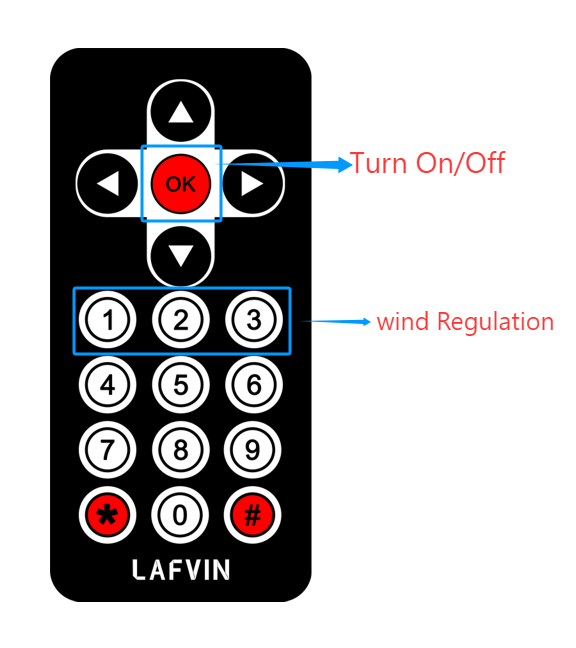
The fan’s operation can be controlled via an infrared remote control. Press the OK button to turn the fan on or off. Press the 1, 2, or 3 buttons to switch between fan speed levels, with the airflow increasing sequentially.
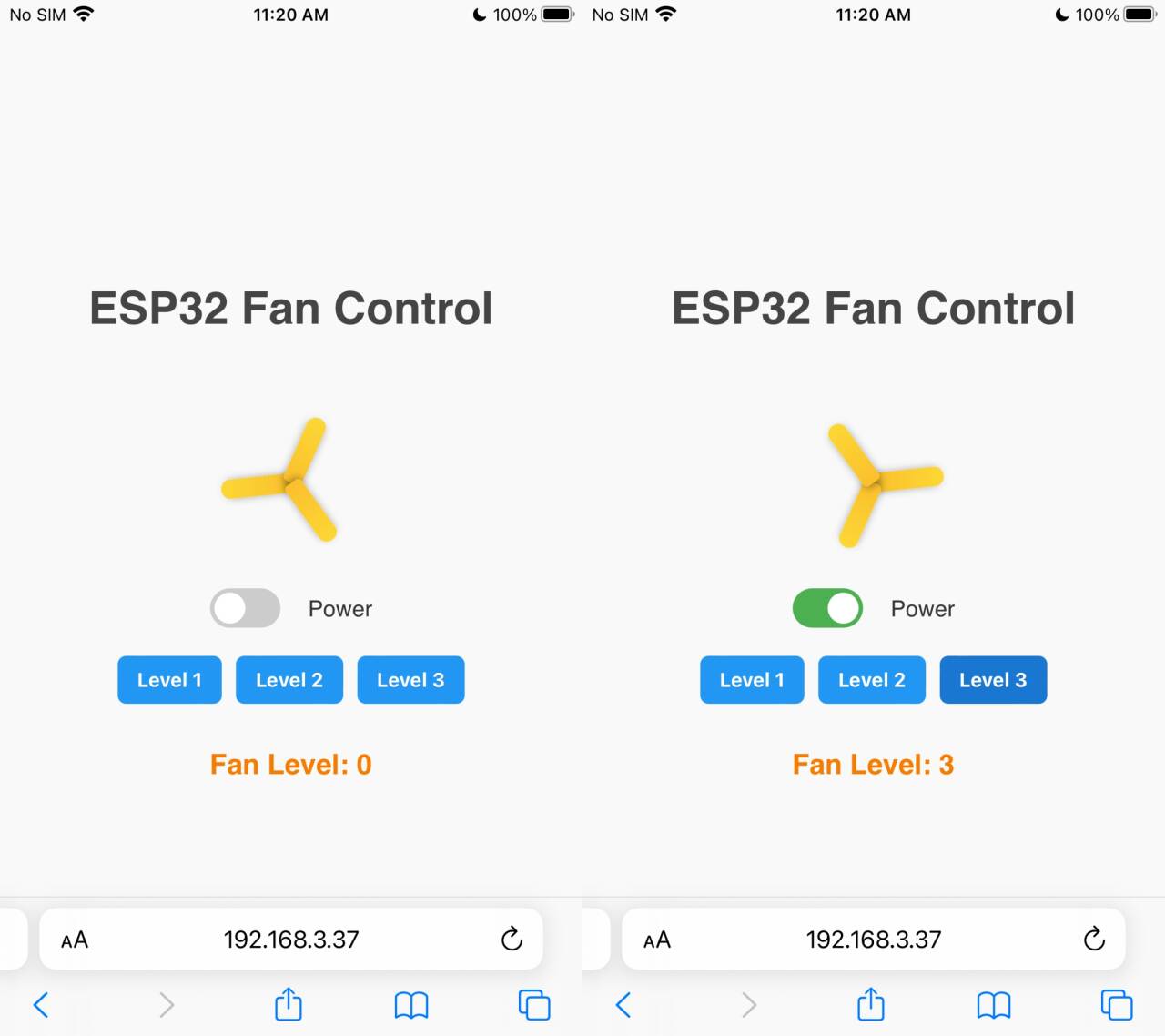
Gear shifting can be controlled via a web page.